
On this page · 11 sections
- How to read an example
- Find: reach the right place
- Read: see the facts exactly
- Act: take the step safely
- Recover: try a better next move
- Hand back: let the person check it
- Boundaries: say what is allowed
- An agent experience checklist
- A template for recording an example
- What this gallery does not claim
- Frequently asked questions
Agent experience examples are most useful when you can check them yourself. Each example below is a public artefact: a documentation page, a changelog entry, a pull request, a command-line flag or a file at a known address. For each one the page names the pattern, says what it does for an agent, links the source and points to the matching part of the Open Agent-Readiness Rubric.
Scope: Every example was retrieved on 8 October 2026 and describes documented behaviour only. This is not a ranking and not a recommendation of any vendor. Where a vendor states a number, it is labelled as the vendor’s figure. Where a vendor states a limit of its own safeguard, the limit is part of the example.
How to read an example
Each example has the same parts:
- Pattern: a short tag for the design idea, such as
error-recoveryorclaim-later-onboarding. - What it is: the artefact and what the source says it does.
- For the agent: the problem it removes for an AI agent acting for a person.
- Rubric: the track and, where one fits, the check it serves in the rubric (v0.3).
- Source: a link you can open, with a date where the source gives one.
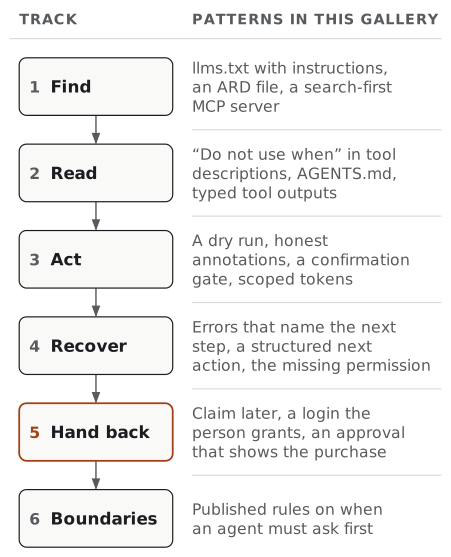
The examples are grouped by the rubric’s six tracks, in the order an agent meets them: Find, Read, Act, Recover, Hand back and Boundaries.
Find: reach the right place
1. An llms.txt that tells agents how to behave
Pattern: llms-txt, docs-for-agents. Rubric: Find, APIs and tools are described where agents look. Source: vercel.com/llms.txt.
What it is. Besides links, Vercel’s llms.txt has a “When to use Vercel” section and a “How agents should use Vercel” section, which says to read the OpenAPI description before choosing an operation, to “Ask for approval before changing account resources”, and to let the user authorise MCP access through OAuth.
For the agent. Before it touches anything, it learns what the product is for, where the machine-readable reference is, and which steps need a person. See the state of llms.txt for what is and is not known about how agents use the file.
2. A discovery file that lists agent resources
Pattern: ard, discovery. Rubric: Find, APIs and tools are described where agents look. Source: supabase.com/.well-known/ard.json.
What it is. Supabase publishes an ARD manifest at the well-known address. Its entries include the MCP server endpoint, the OAuth metadata for that server, the Management API’s OpenAPI document, the llms.txt index and an agent skills index. Each entry has a description and a few example requests, such as “create a new Supabase project”.
For the agent. One fetch tells it which machine interfaces exist and which one fits the task. See Agentic Resource Discovery.
3. One search-first MCP server for a very large API
Pattern: context-budget, code-mode, dynamic-tools. Rubric: Find, There are few enough tools to choose from. Source: Cloudflare blog, 20 February 2026; mcp-server-cloudflare README.
What it is. Cloudflare’s Code Mode MCP server covers its whole API with two tools, search() and execute(). Cloudflare states the pair uses roughly 1,000 tokens of context and covers over 2,500 endpoints, against an estimated 1.17 million tokens for one tool per endpoint (vendor figures). On 6 October 2026 it marked six domain-specific MCP servers as deprecated in favour of this one, and its README has a short “When should you use each?” section.
For the agent. It searches a large catalogue instead of loading every tool definition at once. Anthropic’s guidance on writing tools for agents makes the general case against wrapping every endpoint as its own tool. See tool catalogues.
Read: see the facts exactly
4. Tool descriptions that say when not to use them
Pattern: description, selection. Rubric: Read, Each tool is fully described. Source: Neon MCP server, mcp/tools/definitions.ts.
What it is. Neon’s MCP tool descriptions name the neighbouring tool. describe_table_schema says: “Do not use when you need all tables in a database (use get_database_tables instead).” get_database_tables points back the other way. The repository also keeps a snapshot of the whole hosted tool catalogue under test, so a description change shows up in review.
For the agent. Two similar tools stop looking interchangeable, because each one says which question it is not for. See tool descriptions.
5. A repository instruction file, and a one-line user instruction
Pattern: agents-md. Rubric: Read, Repository instructions give commands and limits. Source: cloudflare/cf AGENTS.md; Use cf with coding agents, updated 29 September 2026.
What it is. The repository for Cloudflare’s cf CLI has an AGENTS.md with the layout, the code generation rules and platform cautions for contributors’ agents. Separately, the product docs give users one line to add to their own agent instructions: “When interacting with Cloudflare, use the cf CLI unless the project has a Wrangler configuration file.”
For the agent. It gets a short, explicit rule at the moment of choice, instead of guessing between an older tool and a newer one.
6. Typed outputs, offered only to clients that can read them
Pattern: schema-enum, drift. Rubric: Read, Inputs have a checkable format (applied to outputs). Source: github-mcp-server v2.0.0, 6 October 2026.
What it is. GitHub’s MCP server 2.0 added structured outputs and output schemas across its tools, to support agents that call tools from code. The release notes say the schemas “are only advertised to clients advertising MCP 2026-07-28 spec support (or later)”, so older clients are not sent contracts they cannot use.
For the agent. It can rely on the shape of a result, and a contract change does not break an agent on an older client.
Act: take the step safely
7. A dry run that needs no credentials
Pattern: dry-run, non-interactive, exit-codes, false-success. Rubric: Act, Effects are stated before the step; the exit code is Recover, Command-line tools report the real outcome. Source: Use cf with coding agents, updated 29 September 2026.
What it is. Cloudflare’s docs describe a three-step route for agents: cf cli search finds a command by describing the task, runs locally and needs no credentials; cf schema shows the API request a command sends; and --dry-run prints that request as JSON “without sending it”. The same page is open about a trade-off: in a non-interactive session, a destructive command without --force prints Aborted. and exits with status 0, and “a successful exit does not mean the resource was deleted.”
For the agent. It can see exactly what a command will do before it runs it. Because of the documented exit code, an agent has to read the output as well as the status to know what happened. Command-line tools report the real outcome asks for the opposite design: a cancelled change exits non-zero.
8. Annotations that match what the tool does
Pattern: description, confirmation. Rubric: Act, Effects are stated before the step. Source: Neon MCP server pull request #367, merged 30 September 2026.
What it is. Neon’s explain_sql_statement tool defaulted to EXPLAIN ANALYZE, which runs the statement in PostgreSQL, while its annotations described every call as read-only. The pull request changes the default to a plain explain, says in the description that analyze: true runs the statement, and marks the annotations as potentially destructive and not idempotent.
For the agent. A client that shows “read-only” tools without asking now asks before a call that can change data. See tool descriptions on why annotations are hints that the server must back up.
9. Tokens scoped to the job
Pattern: auth-scopes. Rubric: Act, Agent access can be narrow. Source: Supabase changelog, 6 October 2026.
What it is. Supabase’s scoped personal access tokens can be limited to selected projects or organisations, set to read or read-write per capability, and given an expiry up to one year out. A token’s access cannot be changed after creation; you delete it and make a new one. The token’s details page lists the MCP tools it can call.
For the agent. It can be given exactly the access one job needs, and a person can see in advance which tools that access opens.
10. A confirmation gate that states its own limits
Pattern: confirmation, approval, secrets. Rubric: Act, Your system enforces approval; Hand back, Approval comes from the person; Boundaries, Secrets never pass through the agent. Source: Supabase MCP docs; OpenAI computer use docs.
What it is. Supabase’s MCP server asks for confirmation before creating a paid project or branch and before destructive SQL. For secrets it sends the person to the dashboard, with the rule “never in chat, model input, or MCP tool arguments.” The docs also say to “Treat elicitations as a guardrail, not a guarantee of human review or approval”, because some clients answer them automatically. OpenAI’s computer use docs make a similar statement about their own gate: “Origin approval does not enforce confirmation before purchases, destructive changes, or other consequential actions.”
For the agent. It meets a pause before costly or irreversible steps. For the product team, the stated limits say what the gate cannot prove, which is what approval workflows are about.
Recover: try a better next move
11. An error that names the next command
Pattern: error-recovery. Rubric: Recover, Errors say how to succeed. Source: Vercel changelog, 18 August 2026.
What it is. Vercel’s Sandbox CLI 4.0.1 changed its messages so that “each of these messages now carries the action to take next”. The changelog’s example for a missing sandbox gives the status code and then a hint: run sandbox ls --all to see the sandboxes in this project.
For the agent. It gets a concrete next command instead of a dead end, so its next attempt is different from its last. See design for recovery.
12. A structured next action on a failed payment
Pattern: error-recovery, handoff. Rubric: Recover, Errors carry a fixed code and Errors say how to succeed. Source: Stripe docs, Enable agents to spend.
What it is. When a spend request in Stripe’s Link agent wallet needs attention, it returns a next_action with a type, a resolution, a customer-facing display_message and, where relevant, an action_url. The docs tell agents to “Branch on resolution, not on type”, and give three resolutions: wait and keep polling, create a new request, or send the customer to the URL first and then create a new request.
For the agent. It does not have to interpret the failure, because the response says whether to wait, retry with a new request, or hand the step to the person.
13. A refusal that names the missing permission
Pattern: auth-scopes, error-recovery. Rubric: Recover, Refusals name the missing permission. Source: Supabase changelog, 6 October 2026.
What it is. With Supabase’s scoped tokens, “A 403 lists the permissions the token lacks in a missing_permissions array.”
For the agent. It can tell the person exactly which permission to grant, instead of reporting a bare “forbidden” or retrying the same call.
14. An error that is the onboarding
Pattern: error-recovery, claim-later-onboarding. Rubric: Recover, Errors say how to succeed; Act, The agent can start before anyone signs up. Source: Clerk blog, 30 September 2026.
What it is. From @clerk/nextjs 7.8.0, an app without Clerk keys throws an error that tells the developer and their agent to run npx clerk@latest init. In a non-interactive context, that command writes the keys without a sign-up or a login, so the agent keeps going. The post adds: “Signing up still exists. It happens after your app is already running.”
For the agent. The first error it meets is also the setup instruction, and setup does not stop for a human sign-up.
Hand back: let the person check it
15. Provision now, claim later
Pattern: claim-later-onboarding, handoff. Rubric: Act, The agent can start before anyone signs up; the claim itself is the hand-back. Source: Neon blog, 10 September 2026; Vercel Claim Deployments docs, last updated 21 August 2026.
What it is. With Claimable Neon, an agent registers anonymously and gets a temporary project. The person signs in later through a short-lived claim link and accepts the transfer. Neon states that an unclaimed project expires after 72 hours and is capped at 100 MB of storage and 1 GB of transfer. Vercel’s Claim Deployments works the same way for deployments: an agent deploys, requests a transfer (the code is valid for 24 hours) and gives the person a claim URL.
For the agent. It can finish the useful part of the job before anyone has an account, and ownership passes to a person in one named step.
16. A login the person grants, by name
Pattern: handoff, auth-scopes. Rubric: Hand back, Agents are told apart from people. Source: netlify.ai.
What it is. Netlify’s agent instructions page tells an agent it can run netlify login --request "{AGENT_NAME} wants to login". That creates a login URL for the person, and a second URL the agent can check to see when the person has signed in. The same page says agents can deploy static sites without a Netlify account.
For the agent. It can ask for access in a way the person can see and approve, with the agent named in the request.
17. An approval that shows what is being bought
Pattern: approval, idempotency, secrets. Rubric: Hand back, Approvals are few and show the real action. Source: Stripe docs, Enable agents to spend.
What it is. A spend request needs an amount and a --context of at least 100 characters, and that context is “what your customer reads when deciding whether to approve”. Optional line items and totals fill in the approval screen. The customer has 10 minutes to respond. Idempotency keys make a retried request return the original response. The docs also say to write card details to a file rather than to standard output, where they “can persist in model transcripts and application logs”.
For the agent. The person approves the real purchase, not a vague request, and a retry after a timeout cannot create a second one.
Boundaries: say what is allowed
The first example already showed one kind of boundary: Vercel’s llms.txt says when an agent must ask first. Example 10 showed another: Supabase’s rule that secrets never pass through the model, which is Secrets never pass through the agent. The rubric’s Boundaries track also asks whether agent operators can reach you (Agent operators can reach you). Two public examples give agents a direct channel:
- Neon’s
send_feedbacktool (pull request #370, merged 4 October 2026) sends anonymous feedback, with no account, project or credentials attached, and is available on every connection. - Stripe’s
link-cli report(Stripe docs) lets an agent report whether a purchase succeeded, was blocked or was abandoned, with a tag such ascaptchaorlogin_required. The docs say this is how Stripe finds checkout flows that break agents.
Pattern: evaluation, measurement.
An agent experience checklist
Use these questions on one job an agent might do with your product. Each one points to the rubric track it serves, so a “no” becomes a specific check to look up.
| # | Question | Track |
|---|---|---|
| 1 | Can an agent find your machine interfaces from one known address, such as llms.txt or an ARD file? |
Find |
| 2 | Does the agent see few enough tools to choose between, or can it search a large set instead? | Find |
| 3 | Does each tool description say when not to use the tool, and name the tool to use instead? | Read |
| 4 | Do inputs and outputs have a schema, with closed sets as fixed lists of allowed values? | Read |
| 5 | Is there a short instruction file that tells an agent which tool or command to prefer? | Read |
| 6 | Can the agent preview a change, such as with a dry run, before it makes it? | Act |
| 7 | Do read-only and destructive labels match what each tool actually does? | Act |
| 8 | Can a person give the agent access to this job only, and see what that access allows? | Act |
| 9 | Is approval enforced by your system, and do you know which confirmations a client could answer automatically? | Act |
| 10 | Can the agent reach a working state before sign-up, with ownership handed to a person in a named step? | Act |
| 11 | Does each common error carry a fixed code and name the next step? | Recover |
| 12 | Does a refusal say which permission is missing? | Recover |
| 13 | Does a command that did not do what was asked exit non-zero? | Recover |
| 14 | Does the approval screen show the real action, amount and effect, on a route the agent cannot operate? | Hand back |
| 15 | Do secrets reach your service without passing through the model? | Boundaries |
| 16 | Have you published what agents may do, when they must ask first, and how their operators can report a problem? | Boundaries |
A “no” points to a check to look at, and the rubric says which checks are stoppers and which can wait.
A template for recording an example
Copy this block to record an example from your own product or someone else’s. Keep one block per example, and fill in the recheck date so the record does not quietly go stale.
## Example: <short name>

- **Pattern:** <one or more tags, for example error-recovery, dry-run>
- **Artefact:** <what it is: an error message, a flag, a file, a doc page>
- **Source:** <URL>
- **Source date:** <date on the page, or "none shown">
- **Retrieved:** <YYYY-MM-DD>
- **Documented behaviour:** <what the source says happens, quoted where short>
- **For the agent:** <the problem it removes for an agent acting for a person>
- **Stated limits:** <anything the source says it does not do, or "none stated">
- **Vendor figures:** <any numbers, labelled as the vendor's, or "none">
- **Rubric:** <track and check name, for example Recover, Errors say how to succeed>
- **Site guide:** <the guide that covers the pattern>
- **How to check it:** <the command, request or page that shows the behaviour>
- **Recheck by:** <YYYY-MM-DD>
What this gallery does not claim
It does not say that any of these products has better agent experience than another, or that any pattern raises task success. None of the cited sources measures the pattern against an alternative, apart from the vendor token figures in example 3, which are labelled. The examples are a dated snapshot of public documentation and code. To learn whether a pattern helps your own product, test it: see measure agent experience and run an AX review.
Frequently asked questions
What are some examples of agent experience? Public examples include an error that names the next command (Vercel’s Sandbox CLI), a structured next action on a failed payment (Stripe’s Link agent wallet), a token that lists the permissions it lacks (Supabase scoped access tokens), a dry run that needs no credentials (Cloudflare’s cf CLI), tool descriptions that say when not to use the tool (Neon’s MCP server), and a claim-later sign-up where an agent provisions first and a person takes ownership later (Neon and Vercel).
What is an agent experience checklist? A short list of questions to ask about one job an agent might do with your product: can it find the right tool, read the facts it needs, act safely, recover from errors, hand the result back to a person, and know what it is allowed to do. The checklist on this page has 16 questions, each tied to a track of the Open Agent-Readiness Rubric.
Is there a template for recording an agent experience example? Yes. The template on this page is a Markdown block with fields for the pattern, the artefact, the source link and retrieval date, the documented behaviour, what it does for an agent, any stated limits, the rubric check and a date to check it again. It is free to copy.
Are these agent experience best practices? Not in the sense of proven practices. Each example shows documented behaviour that addresses a known agent problem. None of the vendors’ documents cited here, and nothing on this site, shows that a given pattern improves outcomes for every product. Microsoft’s AX writing puts it plainly: best practices are hypotheses until you measure them.
Why does the gallery include safeguards with stated limits? Because the stated limit is the useful part. Supabase documents that its MCP confirmations are a guardrail, not a guarantee, since some clients answer them automatically. OpenAI documents that approving a website origin does not confirm purchases or other consequential actions. Knowing what a safeguard does not do tells you what your own system still has to enforce.
How often do these examples change? Often. Every example was retrieved on 8 October 2026, and vendors change docs, flags and error text without notice. The template includes a recheck date for that reason, and a changed or removed example is itself worth recording.
Record the source, the date and the behaviour of each example, so that someone can check it again, and judge it on that evidence.