
On this page · 11 sections
Public agent-readiness and AX scores measure different objects with different methods, so their numbers cannot be compared. One looks at the files and headers of a public website. Another looks at a documentation site, another at how an agent signs up for a developer tool, and another at what happened when agents ran your scenarios. Read side by side, they show which parts of a job each one can see.
Scope: Each tool below is described from its own public documentation, retrieved on 8 October 2026. No scanner was run on any site for this page. Tools are grouped by the object they score, from the widest scan to the narrowest; the order is not a ranking, and this page makes no claim that any score predicts how agents perform. This site publishes one of the methods compared, the Open Agent-Readiness Rubric, so read its entry with that in mind.
Why the numbers do not compare
Every score answers a question about one object: a domain, a documentation site, a getting-started path, a set of agent runs, or one job. Two tools that score different objects can both be right about the same product. A site can pass every documentation check and still have a booking tool that charges a card twice.
Two tools that score the same object still differ in their checks, their weights, the caps they apply and what they leave out as not applicable. So the useful parts of any report are the individual checks and the evidence behind each one. The headline number is a summary of those choices.
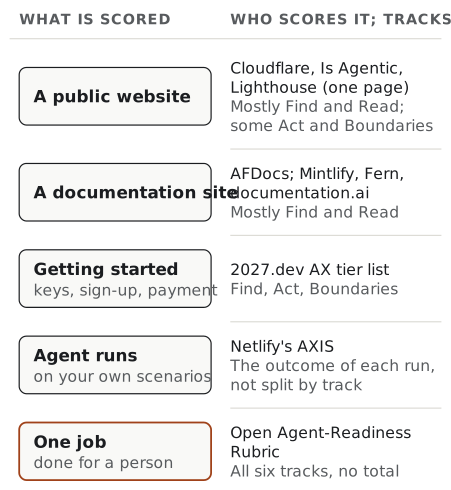
The scores at a glance
| Score | Made by | Object scored | Method | One number? |
|---|---|---|---|---|
| isitagentready.com | Cloudflare | A public website | Automated checks for emerging standards | A readiness level from 0 to 5 |
| Agentic Browsing category | Google Chrome (Lighthouse) | One page as loaded | Deterministic audits in Lighthouse | No: a pass ratio and pass or fail results |
| Is Agentic | Vercel, with scans scored by Ora | A public website | Automated checks grouped by maturity | 0 to 100 |
| AFDocs | Open spec created by Dachary Carey, with a CLI | A documentation site | 28 automated checks in 7 categories | 0 to 100 with a letter grade |
| Mintlify score, Fern Agent Score, documentation.ai Agent Readiness Score | Each vendor | A documentation site | AFDocs-based checks with each vendor’s own scope | 0 to 100, with a grade on Fern and documentation.ai |
| AXIS | Netlify | Agent runs on scenarios you write | Real agents, a transcript and an LLM judge | 0 to 100 per run |
| AX tier list | 2027.dev | How a coding agent gets its own credential | Eval runs plus provider documentation | A tier from S to D, set by the weakest step |
| Open Agent-Readiness Rubric v0.3 | This site | One job done for a person | 40 checks in six tracks, settled by a reviewer | No: a profile of six levels |
Website scanners
Cloudflare’s isitagentready.com
Who and what. Cloudflare launched the scanner on 17 April 2026 (blog.cloudflare.com). It scores a public website.
Method. The scanner sends requests to the site and checks which emerging standards it supports. The live page groups the checks into five categories: discoverability (robots.txt, sitemap, Link headers, DNS for AI discovery), content accessibility (Markdown content negotiation), bot access control (AI bot rules, Content Signals, Web Bot Auth), protocol discovery (MCP Server Card, Agent Skills, WebMCP, API Catalog, OAuth discovery, an ARD manifest and others) and commerce (isitagentready.com). You can choose a site type to change which checks run.
One number? Yes. The launch post described “a score based on four dimensions”. The scanner’s own MCP server card now describes “a readiness level (0-5) across 22 checks” (server card). At launch, commerce checks did “not currently count towards the score”; the live page does not say whether that has changed.
Evidence. A pass or fail for each check, and for each failing check a prompt you can give a coding agent to fix it. The page labels those prompts as AI-generated.
What it cannot tell you. Whether a file it finds is true, whether the facts on your pages are correct, or whether any task completes. A blog with no API has nothing true to put in an API catalogue, and a stub file would pass a presence check while sending agents to an endpoint that does not exist (agent-friendly websites covers this trap).
Lighthouse’s Agentic Browsing category
Who and what. Google Chrome added an Agentic Browsing category to Lighthouse, available from M150 (developer.chrome.com, 22 June 2026). Like the rest of Lighthouse, it audits a page as it loads.
Method. Deterministic audits in three areas: a subset of accessibility audits that matter to agents (programmatic names, valid roles and parent-child relationships, nothing interactive hidden from the accessibility tree), visual stability measured by Cumulative Layout Shift, and WebMCP integration (registered tools, forms missing declarative WebMCP, schema validity). It also checks for an llms.txt file at the domain root (scoring documentation, last updated 5 May 2026).
One number? No, on purpose. The category “does not have a weighted average score from 0 to 100”. It shows a fractional pass ratio and pass or fail results, and Chrome calls it “informational and unbenchmarked” at the time of publication.
Evidence. Reproducible audit results suitable for continuous integration. The documentation warns that results can still move, for example when WebMCP tools are registered by a script after the snapshot.
What it cannot tell you. Anything beyond the page it loaded: whether the site’s other pages, its API or its sign-in work, or whether a multi-step task completes.
Is Agentic, and scanners like it
Who and what. Is Agentic is published by Vercel, and “every check is run and scored by Ora” (is-agentic.com). It scores the public parts of a website.
Method. Essential checks share 80 points and recommended checks share 20. Emerging signals can add a bonus of up to five points without becoming requirements. Checks that do not apply are left out, and API, OAuth, MCP and GraphQL checks only switch on when the scan finds that surface. The essential checks include server-rendered content, correct HTTP behaviour, document structure, recoverable errors, usable controls and page metadata.
One number? Yes, out of 100. Ora’s own methodology also turns its four layers (discovery, access, usability and payments) into a letter grade from A+ to F (ora.ai).
Evidence. Each finding comes with the evidence seen during the scan and a timestamp. Each report also shows one observed agent journey, which is “supporting evidence rather than part of the numeric score”. A result may come from a six-hour cache.
What it cannot tell you. Its own limitations list says scans “observe public behavior at a point in time”, that automated checks can give false results, and that a high score is not a security, accessibility, quality, compliance or compatibility certification. Private pages and signed-in workflows are out of its view.
Many other free website scanners exist. Before you trust one, look for a page that lists its checks, its weights, and what it does with checks that do not apply. If there is no such page, treat the number as unexplained.
Documentation scores
AFDocs, and the Mintlify, Fern and documentation.ai scores
Who and what. The Agent-Friendly Documentation Spec (AFDocs), created by Dachary Carey and licensed CC BY 4.0, defines checks for how well a documentation site serves agents (agentdocsspec.com; web spec version 0.6.0, 13 September 2026). Its companion CLI, afdocs, runs the checks (afdocs.dev). Three documentation vendors build scores on it:
- Mintlify runs
mint scoreand publishes a leaderboard; the command shows “an overall readiness score and individual check results” (mintlify.com; CLI docs). - Fern publishes an Agent Score “in partnership with Dachary Carey”: 0 to 100 and grades from A+ to F, described on its page as 22 checks across 7 categories (buildwithfern.com).
- documentation.ai publishes an Agent Readiness Score for documentation, help centres and knowledge bases, graded Access and Freshness in the web scan, with Answerability added when you run its open-source scanner with your own API key (documentation.ai).
Method. AFDocs has 28 checks in 7 categories: content discoverability, Markdown availability, page size, content structure, URL stability, observability and authentication. Each check has pass, warn and fail criteria and a severity. The vendors’ versions may not all track the latest spec; Fern’s page still describes 22 checks.
One number? Yes for the CLI and all three vendors, out of 100. documentation.ai applies AFDocs’ cap, so “a site with no llms.txt cannot score above 59”, and leaves out checks that could not run.
Evidence. Check-level results with suggested fixes. documentation.ai’s Answerability goes further: an agent tries to answer real questions from your pages, and the report shows the transcript and the reason for each miss.
What it cannot tell you. Anything outside the docs: whether the API they describe works, whether sign-up needs a person, or what happens after an agent acts. Most checks are about delivery (can an agent fetch and fit the page?) rather than truth; documentation.ai’s freshness checks, such as endpoints that are missing from the API specification, are a partial exception.
Scores built on agent runs
Netlify’s AXIS
Who and what. AXIS, the Agent Experience Index Score, is open-source tooling created by Netlify. It describes itself as “Lighthouse, but for agent experience” and scores how agents get on with “your APIs, services, and project structure” (axis.run).
Method. You write scenarios: a prompt, a rubric of checks and optional setup. AXIS runs real coding agents on them (its page lists more than 20) and records a full transcript. Four dimensions are scored (scoring):
- Goal achievement (40%): an LLM judge compares the outcome with your checks.
- Environment (20%): whether shell, file and build commands succeeded, and how fast.
- Service (20%): whether APIs and MCP tools succeeded, and how fast.
- Agent (20%): whether each step the agent took was needed, relevant and the right size.
One number? Yes, a composite out of 100 per run, with configurable weights. Because agents vary between runs, you can repeat a scenario an odd number of times, and AXIS reports the run whose score sits at the median.
Evidence. AXIS records the full interaction transcript of each run, and its HTML report “includes the full scoring breakdown, interaction transcript, and judge evaluations” (quickstart). When a scenario is repeated, the README says the transcript and audits in the report “belong to the run being reported” (README), so each headline score can be traced to one run. AXIS withholds a score, rather than recording a zero, when a run produced nothing or the judge failed.
What it cannot tell you. Anything your scenarios do not ask. It covers the agents you ran, on the date you ran them, at the cost of their tokens. An LLM judge can be wrong. Nothing in the four dimensions looks at whether a person approved an action or can undo it, unless you write that into your own judge checks.
The 2027.dev AX tier list
Who and what. 2027.dev, which offers agent-experience evaluations and reports, publishes an “Agent Experience (AX) Tier List” on “how hard it is for a coding agent to get its own credential from a developer tool” (2027.dev).
Method. Each tool is graded on four criteria: login flow, bot protection, paywall and sign-up. A separate Discovery column records whether agents in its runs actually found the best path. Runs come from its evaluation programme between June and September 2026, across named model families. Login flow and paywall are mostly verified from runs; bot protection and sign-up are mostly read from provider documentation.
One number? One tier, from S (“Hands-off”) to D (“Blocked”). It is not a sum: “a provider’s tier is set by its weakest criterion”, because one blocking step stops an agent.
Evidence. Every evidence cell names its source (an eval run, the provider’s docs or the list’s own check), and a run only overrides documentation where the agent actually tried that path.
What it cannot tell you. Anything after the agent has its credential: whether it then uses the tool correctly, recovers from errors or leaves a record the person can check. It covers developer tools it has evaluated, not websites in general.
A job-level profile
The Open Agent-Readiness Rubric v0.3
Who and what. This site’s draft rubric (version 0.3, 8 October 2026, CC BY 4.0) checks one job an agent does for a person, such as booking a service and paying a deposit (the rubric).
Method. A reviewer settles 40 checks across six tracks (Find, Read, Act, Recover, Hand back and Boundaries) as met, partly met, not met, not applicable or not checked. A fixed rule turns them into a level for each track.
One number? No. Each track gets one of four levels, and the levels are never added up. Stoppers, such as a payment that can be charged twice, are reported first. Five always apply, and two more apply only when the job needs them: a fresh approval from a person, and keeping secrets out of the model.
Evidence. Each check carries an evidence class (Studied, Reasoned or Convention). The top level, Shown, needs watched agent runs; the others rest on what the product states.
What it cannot tell you. Anything about other jobs, other dates or agents you did not watch. It is slower than a scanner because a person does it, and it is a draft, not a standard or a certificate.
Mapped to the six tracks
The table maps each score’s published checks to the rubric’s six tracks. It is this site’s reading of each tool’s public criteria, not a statement by the tool’s maker. “Partly” means a few checks touch the track; “Indirect” means the track only shows up through the outcome of a run.
| Score | Find | Read | Act | Recover | Hand back | Boundaries |
|---|---|---|---|---|---|---|
| Cloudflare’s scanner | Yes | Partly | Partly | No | No | Yes |
| Lighthouse Agentic Browsing | Partly | Yes | Partly | No | No | No |
| Is Agentic | Yes | Yes | Partly | Partly | Not stated | Not stated |
| AFDocs-based docs scores | Yes | Yes | No | No | No | No |
| AXIS | Indirect | Indirect | Partly | Indirect | Only if you add a check | No |
| 2027.dev tier list | Yes | No | Partly | No | Partly | Partly |
| Open Agent-Readiness Rubric | Yes | Yes | Yes | Yes | Yes | Yes |
Three patterns stand out. Find and Read are well covered, because they can be checked from outside with a request. Act is mostly checked for presence, such as whether an OAuth or MCP endpoint is advertised, not for whether the action is safe. Recover, Hand back and Boundaries are thin: they depend on what happens after a call fails or succeeds, and on what a business allows, which a scan of public files rarely reaches. In the rubric, four of the seven stoppers sit in Act and Hand back, the tracks these checks see least.
A worked example
Brightwater Bike Repair is a fictional workshop, the same one used in the rubric’s worked example. Suppose its owner has just done the easy wins: Markdown versions of every page, a clean sitemap and an llms.txt file that lists only live pages.
The owner then reads three reports. A website scanner gives a high result, because the files and headers are there. A docs score is good, because the pages are small and in Markdown. An AXIS run on “find a free slot next Tuesday” passes.
Now Amira asks her assistant to “book a full service next Tuesday and pay the £20 deposit”. The booking tool accepts a payment with no sign of her approval, and a retried call after a timeout can charge her twice. None of the three reports looked for either problem, because none of them was scoring that job. A job-level review puts both at the top as stoppers.
The reports were not wrong; they answered narrower questions. The owner’s next step is to fix approval and double charging first, then use the scanners to keep the public files honest.
How to read a score you already have
- Name the object. Write down what the tool scored: a domain, one page, a docs site, a sign-up path or a set of runs.
- Open the checks. Ignore the headline number until you have read which checks passed, failed or were left out.
- Ask whether each failing check applies. A site with no API should not publish an API catalogue to pass a check.
- Note the date and the version. Methods change. Compare a score only with an earlier score from the same tool, on the same object, under the same method.
- Place the failures on the six tracks. If everything sits in Find and Read, the report has said nothing about Act, Recover, Hand back or Boundaries.
- Check one real job. For anything that spends money or acts in a person’s name, follow the job itself with the agent-readiness rubric or an AX review.
What none of them can tell you yet
None of the public pages reviewed here publishes a study showing that a higher score means agents complete more real tasks for people across sites. Ora says its checks come from watching agents in its own research lab, but its methodology page does not publish that data. The tools that watch agent runs, AXIS and the 2027.dev list, see real outcomes, but only for their own scenarios, agents and dates. The others check what is present, which is useful and cheap but is not the same as checking what works. Several of their makers say so themselves.
Frequently asked questions
How can I tell if my website is agent-ready? Start with one job a person would hand to an agent on your site, such as checking a price or making a booking, and follow it step by step. A website scanner such as Cloudflare’s isitagentready.com or Is Agentic will list missing files and headers, which is a useful start, but none of them can tell you whether that job completes, whether an agent’s payment needs the person’s approval, or whether the person can undo what was done.
Is my site agent ready with Cloudflare? Cloudflare’s isitagentready.com checks a public site for emerging standards in five groups: discoverability, content accessibility, bot access control, protocol discovery and commerce. Its own MCP server card describes the result as a readiness level from 0 to 5 across 22 checks. A high level means the files and headers it looks for are present. It does not mean the facts on your pages are right or that any task will succeed.
What is an agent readiness score? A number or grade that summarises automated checks of whether a website, documentation site or developer tool has put in place things agents use, such as a sitemap, Markdown versions of pages or an MCP server card. Each tool picks its own checks and weights, so a score only means something next to the list of checks behind it.
Is there a Lighthouse for AI agents? Lighthouse itself has an Agentic Browsing category, available from Chrome M150, with deterministic audits of the accessibility tree, layout stability, WebMCP tools and llms.txt. Unlike other Lighthouse categories it has no weighted score out of 100: it shows a pass ratio and pass or fail results. Netlify’s AXIS and Fern’s Agent Score also describe themselves as Lighthouse for agents, for agent runs and for documentation respectively.
Can I compare scores from different agent readiness checkers? No. The checkers score different objects, with different checks, weights and caps, so a 70 from one tool and a 90 from another say nothing about each other. Compare a score only with an earlier score from the same tool, on the same object, under the same version of its method.
Which agent readiness checker should I use? The one whose object matches what you are changing. Use a website scanner for public pages, an AFDocs-based check for documentation, an agent-run tool such as AXIS when you can write realistic scenarios and pay for runs, and a job-level review when the job spends money or acts in a person’s name. This page does not rank them.
A readiness score is a list of checks with a number on top. Read the checks, fix the ones that apply to you, then watch one real job.