
On this page · 18 sections
- What does the rubric check?
- Why is there no single score?
- What are the six tracks?
- What do the four levels mean?
- What level does a job need?
- How strong is the evidence?
- How do you use the rubric?
- A worked example
- Find: reach the right place
- Read: see the facts exactly
- Act: take the step safely
- Recover: try a better next move
- Hand back: let the person check it
- Boundaries: say what is allowed
- How do you reach Shown?
- How is this different from agent readiness scanners?
- What changed in version 0.3?
- Frequently asked questions
The Open Agent-Readiness Rubric is a checklist for one job that an AI agent does for a person. The result is a profile: six ratings along the job, with anything serious listed first.
This is version 0.3 (draft, 8 October 2026, licence CC BY 4.0). It adds six checks to version 0.2 and strengthens three, without removing or renumbering any (what changed). Version 0.2 itself replaced version 0.1, which added 36 weighted checks into a score out of 100. The JSON version holds every check in full, with the studies behind it, and maps each old check to its new one. Version 0.2 and version 0.1 stay available.
What does the rubric check?
An agent here means software, such as an AI assistant, that uses a product on a person’s behalf. A job is one thing the person hands over, written in their own words.
This guide uses one example all the way through. Brightwater Bike Repair is a small bike workshop, invented for this guide. It has a website with its prices, a booking page and an account area. It also has a booking API (a way for software to make bookings directly) and a small MCP server (a standard way to offer tools to AI agents) with three tools: find_slots, book_service and pay_deposit.
Amira is a customer. She might give her assistant either of these jobs:
- A look-up: “Does Brightwater service e-bikes, and what does a full service cost?”
- A booking: “Book a full service for my bike next Tuesday and pay the £20 deposit.”
Why is there no single score?
The same workshop can be ready for the look-up and not for the booking. One number for the whole site would average a price check that works with a payment that might charge Amira twice. The result would be true of neither job.
So the rubric rates each part of the job and never adds the ratings up. Standards such as WCAG and SLSA work the same way.
What are the six tracks?
A track is one part of the job. The six tracks follow the job in the order an agent meets it.
| Track | The question | For Amira’s booking |
|---|---|---|
| Find | Can the agent get to the right place? | Can her assistant reach the booking page? |
| Read | Can it read the facts the decision depends on? | Can it see the free slots and the deposit rule? |
| Act | Can it take the step safely? | Will the system make sure Amira approved the payment? |
| Recover | When something fails, can it find a better next move? | If 14:00 is taken, does it learn which slots are free? |
| Hand back | Can the person see, check and undo what was done? | Can Amira see the booking and cancel it? |
| Boundaries | Have you said what agents may do and see? | Do the terms allow her to use an assistant at all? |
Act, Recover and Hand back only apply when the job changes something. For the look-up, only Find, Read and Boundaries count.
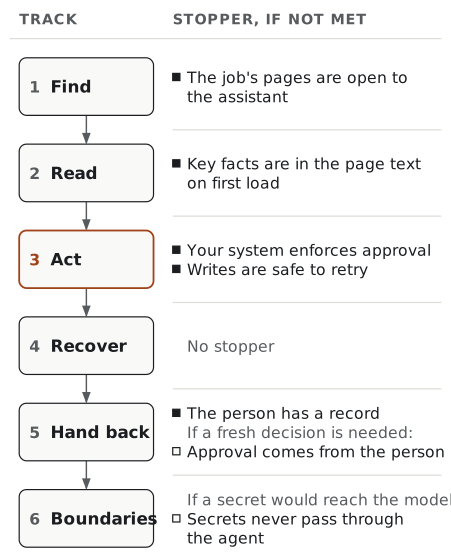
Five checks are stoppers. If one fails, the job should not be handed over at all, so it goes at the top of the report, in plain words. Two more are conditional stoppers: Approval comes from the person when a consequential step needs a fresh decision from a person, and Secrets never pass through the agent when a secret would reach the model.
What do the four levels mean?
Each track gets one level, which says what the person can rely on.
| Level | What it means | What the person should do |
|---|---|---|
| Not yet | The agent cannot do this part, or only by luck. | Do not hand it over yet. |
| Partly | A determined agent gets through by working around the product, such as by guessing. | Check the result. |
| Dependable | The product clearly states what the agent needs, where it looks, and it is correct. | Rely on what the product says. |
| Shown | Dependable, and you have watched agents do it several times and checked your own records. | Know that someone has tried it first. |
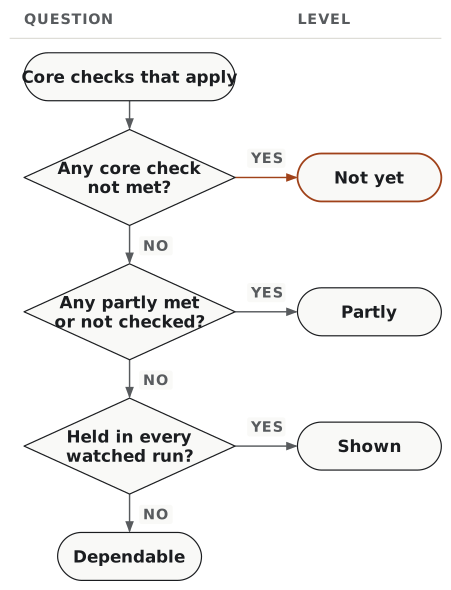
Each check is marked met, partly met, not met, not applicable or not checked. Only core checks decide a level. Supporting checks never change it; they go on a list of things also worth doing. A fixed rule gives the level:
- Not yet: any core check that applies is not met.
- Partly: no core check is unmet, but at least one is only partly met or was not checked.
- Dependable: every core check that applies is met.
- Shown: Dependable, and the track held in every run you watched (see below).
A track is not applicable when none of its checks apply.
A false promise counts as not met. A file that lists deleted pages sends agents the wrong way with confidence, which is worse than saying nothing.
What level does a job need?
It depends on the stakes: what can go wrong for the person. A look-up needs less than a payment, just as OWASP ASVS keeps its top level for high-value transactions.
| Stakes | Target |
|---|---|
| Look up or compare, such as a price | Find, Read and Boundaries at Dependable |
| A change that can be undone, such as a free booking | Every track at Dependable |
| Spends money, acts in the person’s name, or cannot be undone | Every track at Dependable; Act and Hand back at Shown before wide use |
How strong is the evidence?
Every check has an evidence class, which says how strong the reason for it is:
- Studied: a study links it to how well agents do real tasks. Most are recent preprints, not yet peer reviewed.
- Reasoned: it follows from how agents, protocols or people work, but no study has tested it on its own yet.
- Convention: an expected courtesy or standard. There is no evidence yet that it changes whether a job gets done.
Most conventions are supporting checks, except in Boundaries, which is about permission rather than success. Each check also lists the surfaces it applies to, such as a website, an API or a command-line tool.
How do you use the rubric?
- Choose one job, in the words a person would use to hand it over.
- Mark the stakes and the surfaces. Together they decide which checks apply.
- Settle each check as met, partly met, not met, not applicable or not checked.
- Give each track a level by the rule above.
- Report the stoppers first, then the profile next to the target. Name the job, the stakes, the surfaces, the date, the method and the rubric version. Add anything you could not check, and up to three first fixes.
- If you can, watch agents do the job. Only this can reach Shown.
Never add, average or rank profiles. Compare them only for the same job and version. A profile is not a certificate.
A worked example
The look-up job. Find and Read are Dependable: the pages open, and “Full service £85” is in the page text. Boundaries is Not yet, because the terms forbid “automated access”. The other tracks do not apply.
The booking job. This job spends money, so the target is high. Three stoppers go first:
- The server accepts
pay_depositwithout any approval from Amira (Your system enforces approval). - A deposit call that times out and is retried can charge her card twice (Writes are safe to retry).
- Nothing shows that Amira made a fresh decision, through a route the agent cannot operate, before the non-refundable deposit is paid (Approval comes from the person, a conditional stopper that applies here).
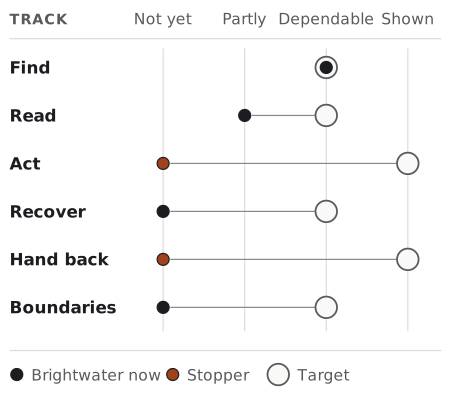
In one line: Find Dependable · Read Partly · Act Not yet · Recover Not yet · Hand back Not yet · Boundaries Not yet.
The first three fixes: make pay_deposit check approval and refuse to charge twice; make errors list the free slots; put free slots in the page text.
So agents can already answer Brightwater’s customers’ questions, but they should not yet be trusted with deposits. One number could not have said both.
A command-line job. Brightwater’s owner, Sam, asks a coding agent to “cancel every booking on Saturday 14 November and email each customer” with the workshop’s command-line tool, bw. The emails cannot be recalled, and the same checks apply as for an API: what counts is what a step does, not where it runs. Two stoppers go first: bw bookings cancel runs once the agent adds --yes (Your system enforces approval), and that flag, which the agent can type itself, is the only approval (Approval comes from the person). Without a terminal and without --yes, it prints “Aborted.” and exits 0 (Command-line tools report the real outcome). In one line: Find and Read not applicable · Act Not yet · Recover Not yet · Hand back Not yet · Boundaries Dependable. First fix: Sam approves in Brightwater’s phone app, and the command runs only with that approval, for those bookings.
Find: reach the right place
The job’s pages are open to the assistant
Core, stopper. Studied. Website, documentation, API, signed-in app.
If the door is shut, nothing else matters (Vercel). Check: open each page the job uses, with curl and with the assistants your customers use. You should get the page or a sign-in, not a block (403), a challenge or an empty page. At Brightwater: met. robots.txt blocks only GPTBot, a training crawler.
Real links lead to the job
Core. Studied. Website, documentation.
Agents usually start where people do, on the home page. Check: from the home page, follow ordinary links to the job. Note any step that needs a hover, a script or a search box. At Brightwater: met. The home page links to the services and booking pages.
Addresses stay the same
Core. Reasoned. Website, documentation, API.
A link Amira saved last week must still lead to the same page. Check: each page has one fixed address with no session codes. Moved pages redirect (301 or 308). Example: /book stays /book, not /book?session=8f2a.
Published page lists are accurate
Supporting. Convention. Website, documentation.
A list of deleted pages sends agents in circles, and no study shows that such lists help. Check: every address in your sitemap and llms.txt works and is current. At Brightwater: not met. llms.txt lists two pages deleted in the spring.
APIs and tools are described where agents look
Supporting. Convention. API, tool catalogue.
A description file, such as an OpenAPI document or an ARD manifest, tells an agent what it can do. A wrong one is worse than none. Check: every service named in the file works when called. At Brightwater: partly met. The OpenAPI document is current, but the MCP server is only mentioned on a docs page.
There are few enough tools to choose from
Core. Studied. Tool catalogue.
The more look-alike tools an agent sees, the more often it picks the wrong one (arXiv 2605.24050; see tool catalogues). Check: count the tools the agent sees when it must choose, and look for near-duplicates. At Brightwater: met. Three tools, each with a clear job.
Read: see the facts exactly
Key facts are in the page text on first load
Core, stopper. Studied. Website, documentation, signed-in app.
Many agents read a page without running its scripts, so a fact that appears later does not exist for them. In one test shop, a version built for agents raised success from about 49% to 89% (arXiv 2607.12056). Check: read the page as first sent. Price, availability, rules and next steps should be text, not only images, PDFs or pop-ups. At Brightwater: partly met. Prices are in the text, but free slots appear only after a calendar script runs.
Controls are real and named
Core. Studied. Website, signed-in app.
An agent picks an action by its name, and a box that only looks like a button has none (arXiv 2609.19125; see agent-friendly websites). Check: in the accessibility tree (the page structure screen readers use), links are links, buttons are buttons and fields have labels. At Brightwater: partly met. Most controls are real, but “Next” and “Confirm” are plain div boxes.
Each result is written down
Core. Reasoned. Website, signed-in app.
An agent checks its work by reading the page again. Check: confirmations and errors appear as words, not only as a colour or an icon. At Brightwater: partly met. Success is a green tick with no text, so the assistant may not know the booking worked, and may book again.
Each tool is fully described
Core. Studied. API, tool catalogue.
The description is all an agent reads before it chooses. In a study of 10,831 MCP servers, fixing wrong descriptions changed tool choice most (arXiv 2602.18914; see tool descriptions). Check: each description says what the tool is for, when not to use it, what it needs and what it returns. At Brightwater: partly met. They say what each tool does, but not when not to use it.
Inputs have a checkable format
Core. Studied. API, tool catalogue.
A schema (a formal description of each input) lets software catch a badly formed call before it is sent. Check: a current OpenAPI document or JSON Schema, with required fields marked and fixed lists of allowed values. At Brightwater: met. The OpenAPI document is current.
Answers fit in one read
Supporting. Studied. API, tool catalogue, documentation.
Agents rarely ask for page two (arXiv 2608.26130). Check: with normal inputs, the answer is in the first page of results, and filters exist. Example: find_slots for one day should return that day’s slots, not a month.
Headings name what is below them
Supporting. Reasoned. Website, documentation.
Agents read long pages in pieces, and clear headings help them pick the right piece. Check: one main heading, no skipped levels, and opening sentences that make sense alone. Example: “Deposits and cancellations”, not “Good to know”.
A plain-text version matches the page
Supporting. Reasoned. Website, documentation.
A Markdown copy is cheaper to read, but nobody has shown it helps when the page is already readable. Check: it matches the page, and the page links to it. Example: a services.md next to Brightwater’s services page.
Structured data agrees with the page
Supporting. Convention. Website, documentation.
Structured data is hidden code that describes a page for machines. Check: every value and date in it matches the page. Example: if it says £75 and the page says £85, a machine gets a confident wrong answer.
Repository instructions give commands and limits
Supporting. Studied. Code repository.
For coding agents, a general tour of the code added cost without adding success (arXiv 2602.11988). Check: AGENTS.md or a similar file is short and lists the build and test commands and clear “do not” rules. Example: “Run npm test. Never edit generated files.”
Agent instructions match production
Core. Reasoned. Documentation, tool catalogue, command-line tool, when the product publishes instructions for agents.
Agents follow instructions literally, so a skill, a plugin or an llms.txt that names a package, tool or flag that no longer exists sends them the wrong way with confidence. Vercel fixed exactly this in its own agent plugin: a recommended package that is not published on npm, and instructions describing features its production MCP server did not offer (pull request 306 and pull request 307, October 2026). Check: every command, package, tool name, flag and link in your agent instructions exists in production and does what they say, and tool annotations such as read-only match what the tool does. At Brightwater: met. The docs page that mentions the MCP server names the three tools exactly as the server lists them.
Act: take the step safely
Effects are stated before the step
Core. Reasoned. Website, API, tool catalogue, signed-in app, command-line tool.
An agent cannot guess that a deposit is non-refundable. Check: next to each action, in the page, the tool description or the command’s help: the cost, who will see it, and whether it can be undone. At Brightwater: not met. The rule that the deposit is non-refundable within 24 hours is only in a PDF.
Your system enforces approval
Core, stopper. Studied. API, tool catalogue, signed-in app, command-line tool, when the job is consequential.
“Ask the user first” in a tool description is only advice. Some shipped products ran a different action from the one approved (arXiv 2609.21081; see approval is a workflow). Check: in a test account, try the step without approval, then with an approval for a different amount. Both should be refused. The request should also name what the step sets off beyond itself, and an approval given for one task should not work for a later one (arXiv 2609.28586, arXiv 2609.33910). A --yes flag the agent can pass itself is not an approval; who approves, and how, is Approval comes from the person. At Brightwater: not met. The server accepts pay_deposit with no approval.
Writes are safe to retry
Core, stopper. Studied. API, tool catalogue, signed-in app, command-line tool.
Agents retry after a timeout, and the first try may already have worked. An idempotency key is a unique label that makes a request sent twice happen once. In one test sandbox, keys cut duplicate actions from 28% to 4% of runs (arXiv 2609.29095). Check: send the same write twice with the same key, or run the same command twice; it should happen once. At Brightwater: not met. pay_deposit takes no key.
Agent access can be narrow
Core. Reasoned. API, tool catalogue, signed-in app, command-line tool.
A key to the whole account makes every mistake as costly as it can be. Check: the person can give an agent access to just this job, and take it back without losing their own. Example: a key that can book and pay deposits but cannot change Amira’s address. (The version 0.1 criterion on agent identity is now Agents are told apart from people.)
Limits are published
Supporting. Reasoned. API, tool catalogue, command-line tool.
An agent that cannot see its limits waits too long or keeps going until it is blocked. Check: limits are documented. Example: a “too many requests” error (429) says “try again in 30 seconds” (Retry-After: 30).
There is a direct route, not only clicks
Supporting. Reasoned. Website, signed-in app, API, tool catalogue, command-line tool.
A direct call says exactly what will happen and can be recorded. Clicking works until the page layout changes. Check: the action is also available through an API, a tool, a command or a declared form, with the same rules. At Brightwater: met. book_service and the booking API both exist.
The agent can start before anyone signs up
Supporting. Reasoned. Documentation, API, tool catalogue, command-line tool, when the job starts by creating something new.
An agent that meets a sign-up form has to stop and wait for a person. Some products now let it start first. Clerk’s setup command creates an unclaimed development app when nobody is signed in (Clerk, 30 September 2026), and Neon lets an agent create a temporary database that a person claims later through a short-lived link (Neon, 10 September 2026). Check: with no account, the agent either reaches a working, non-production version with documented limits and a claim step for the person, or is told plainly that an account comes first and how to hand that step to the person. Claiming, going live and paying stay with the person. Example: “Created a test project that lasts 72 hours. To keep it, send the person this claim link.”
Recover: try a better next move
Errors carry a fixed code
Core. Reasoned. Website, API, tool catalogue, signed-in app, command-line tool.
A code lets an agent tell “try another time” from “try another card”. Wording can change; a code should not. Check: common failures return a fixed code as well as a message. At Brightwater: not met. Every error is a plain 400 with a sentence.
Errors say how to succeed
Core. Studied. Website, API, tool catalogue, signed-in app, command-line tool.
In a small study, clear suggestions in errors raised task completion by 36.7 to 40 points on two of three models (arXiv 2606.05037; see design for recovery). The next step must be one the agent can take. In a September 2026 preprint testing five OpenAI models, an expired-credentials error that said to run a terminal command left 45% of tasks recovered, and naming the server’s own login tool raised that to 84% (arXiv 2609.35381). When the step belongs to the person, say so: Stripe’s spend requests return a next_action with a link to send the customer to. Check: a wrong request gets an answer that names the field, the rule and the allowed values, or the call to make next. A failure only the person can fix names their step and gives a link. At Brightwater: not met. It says only “Invalid booking”, not “14:00 is taken; 15:30 and 16:00 are free”.
The agent can check what happened
Core. Studied. API, tool catalogue, signed-in app, command-line tool.
Without a way to ask “did that go through?”, the agent must repeat a step that may have worked, or give up on one that may not have. Check: an action can be looked up and shows completed, failed or in progress. At Brightwater: met. The booking API shows the payment status.
Long jobs can resume
Supporting. Reasoned. API, tool catalogue, signed-in app, command-line tool.
Starting a long job again risks doing the first half twice. Check: stop the job halfway, then read its state and continue. Example: a job to book three bikes stops after the second; it should carry on with the third.
Refusals name the missing permission
Core. Reasoned. API, tool catalogue, command-line tool, when the job uses access narrower than the person’s account.
A narrow key is safer (Agent access can be narrow), but only if the agent can tell what is missing when it is refused. The MCP specification asks servers to answer with 403 and every scope the operation needs, in one go (MCP 2026-07-28), and Supabase’s API lists them in a missing_permissions array (Supabase, 6 October 2026). Check: with a key that lacks one permission, try the step. The refusal names the missing permission in a field the agent can read, and says where the person grants it. Example: 403 with missing_permissions: ["deposits:write"], so the assistant asks Amira for that one permission, not for her whole account.
Command-line tools report the real outcome
Core. Reasoned. Command-line tool, when the job runs through a command-line tool.
For an agent in a terminal, the exit status is often the main sign of success: 0 means it worked. A public bug report against cf@1.0.0-beta.5, a beta of Cloudflare’s cf tool, shows cf workflows delete run without a terminal (CI=true, no input) and without --force printing “Aborted.”, deleting nothing and exiting 0 (cloudflare/cf issue 94, opened 29 September 2026, open when checked on 8 October 2026). It covers that release and setting only. Agents already tend to claim success they did not achieve: in one browser benchmark, 75% of agent failures ended that way (arXiv 2609.35814). Check: run the commands without a terminal attached. A failure, a refused confirmation and a cancelled change each exit non-zero and say why. A search that finds nothing, or a change that was already made, may exit 0 if the command’s contract counts it as success, as long as the output says so. Example: a delete that needs --force and did not get it exits 1 with “Not deleted: add –force to confirm”, while a search with no matches can exit 0 with an empty list.
Hand back: let the person check it
The person has a record
Core, stopper. Reasoned. Signed-in app, API, tool catalogue, command-line tool.
If the only account is the agent’s message, Amira cannot tell a clean booking from a double charge. Check: signed in as the person, find each action with its time, details and result, including failures and retries. At Brightwater: met. The account area lists each booking and deposit.
The person can undo from the record
Core. Reasoned. Signed-in app, API, tool catalogue, command-line tool.
Seeing a mistake does not fix it. Check: from the record, the person can cancel or reverse the action, or reach someone who can. At Brightwater: met. Each booking has a Cancel button.
Agents are told apart from people
Core. Reasoned. API, tool catalogue, signed-in app, command-line tool.
Knowing who acted lets Amira switch off one assistant without locking herself out. Check: agent requests carry their own identity, and the record shows which actions an agent took. At Brightwater: not met. An assistant’s booking looks like Amira’s own.
Approvals are few and show the real action
Supporting. Studied. Signed-in app, API, tool catalogue, command-line tool.
Ask too often and people stop reading (arXiv 2606.08919). Anthropic reports, from its own telemetry, that users approved roughly 93% of Claude Code permission prompts (vendor report, May 2026). Check: small steps that can be undone do not ask. Big ones do, and show the real amount or change. Example: “Pay £20 deposit, not refundable after 24 hours”, not “Continue?”.
Approval comes from the person
Core, conditional stopper. Reasoned. Signed-in app, API, tool catalogue, command-line tool, when the job asks the person to approve a step.
A stopper when a consequential step needs a fresh decision from a person, not one covered by a rule they set earlier. A “yes” protects Amira only if Amira gave it. Supabase calls its MCP confirmation forms “a guardrail, not a guarantee of human review or approval”, because some clients answer them automatically (Supabase; see confirmation is not approval). Signing in is not enough either: MCP has the server check which user opens an approval link (MCP 2026-07-28), and an agent driving a browser signed in as Amira is that user. Check: the approval comes by a route the agent cannot operate, such as your app on Amira’s phone, a passkey prompt that needs her present (WebAuthn) or an approver your policy names, is tied to the exact amount and target, and expires. Try a flag in the agent’s call, a form its client answers, its own signed-in browser, another user and an old approval: none should work. A signed-in page alone is partly met at most. At Brightwater: not met. There is no approval step at all (see Your system enforces approval).
Boundaries: say what is allowed
Crawler rules are a choice
Core. Convention. Website, documentation.
Many sites mean to block only training crawlers but also block the assistant a customer is using. Check: robots.txt and any Content Signals treat search, answers and training separately, and do not block assistants working for a person. At Brightwater: met. Only GPTBot is blocked.
The terms say whether agents may be used
Core. Convention. Website, signed-in app, API.
Terms written against scrapers often forbid, by accident, the assistant a paying customer uses. Check: the terms mention automated access for a signed-in customer. At Brightwater: not met. They forbid all “automated access”.
Your signals agree
Core. Convention. Website, documentation, API, tool catalogue.
When your files disagree, whoever reads them decides which one wins. Check: robots.txt, the terms and any description files do not contradict each other. At Brightwater: not met. robots.txt allows assistants, but the terms forbid them.
Agent operators can reach you
Supporting. Convention. Website, API, tool catalogue.
Without a contact, someone whose agent is blocked can only work around you. Check: a published contact, linked from robots.txt or the docs. At Brightwater: not met. There is no such contact.
Secrets never pass through the agent
Core, conditional stopper. Reasoned. API, tool catalogue, signed-in app, command-line tool, when the job needs a secret.
A stopper when finishing the job would put a password, key, token, one-time code or payment details where the model can read them, or in logs. Anything an agent reads can end up in transcripts and logs, and a code that expires in minutes stays readable there. MCP forbids asking for passwords, keys or payment details through a form the agent’s client handles, and requires a link the person opens (MCP 2026-07-28). OpenAI’s computer use keeps sign-in values, codes included, out of the model’s input and history (OpenAI). Check: no tool input, flag or instruction asks the agent for a secret’s value, and no command prints one. The person types it into a field the model cannot read, or the agent names it and the value is filled in when the call runs. At Brightwater: not applicable. The deposit is charged to the card saved in Amira’s account, so the job needs no secret from her.
How do you reach Shown?
Checks tell you what your product says. Only watching agents tells you whether they can use it. The result is a record, never a number.
- Write the job once, in the person’s words, and use the same wording every time.
- Use the assistants your customers use. Run the job at least three times with each, starting fresh each time.
- Give only the access the person would give, in a test account where effects can be undone.
- Record where each run stopped, and what your own records show, not what the agent says.
- Mark a track Shown only if it held in every run. Keep the date, the assistants and their versions.
Three runs are a check, not a measurement. Results vary: one audit saw an 18.9-point spread from repeating the same test 23 times (arXiv 2607.02577). So Shown needs every run to hold, instead of turning a success rate into a score.
How is this different from agent readiness scanners?
Scanners such as isitagentready.com (Cloudflare) and is-agentic.com (Vercel with Ora) look at a whole public site from the outside and give a score. This rubric looks at one job, including the parts a scanner cannot reach without an account: approval, retries, errors and the person’s record. The results cannot be compared. The JSON version lists more tools, as checked on 25 September 2026.
Use a scanner for the basics. Then use this rubric, or an AX review, for the jobs you want agents to do.
What changed in version 0.3?
Version 0.3 is a draft. It keeps the six tracks, the four levels, the level rule, the five stoppers and the targets, and every version 0.2 check keeps its number. It adds six checks, drawn from what products shipped for agents in September and October 2026, and two of them are conditional stoppers:
| New check | Track | Role |
|---|---|---|
| The agent can start before anyone signs up | Act | Supporting |
| Agent instructions match production | Read | Core |
| Refusals name the missing permission | Recover | Core |
| Command-line tools report the real outcome | Recover | Core |
| Approval comes from the person | Hand back | Core, conditional stopper |
| Secrets never pass through the agent | Boundaries | Core, conditional stopper |
It also strengthens three checks. Your system enforces approval now asks whether the approval shows what a step sets off beyond itself, and whether an approval can be reused for a later task. Errors say how to succeed now asks for a next step the agent can actually take, or a named step for the person with a link. Approvals are few and show the real action adds a vendor’s report on how often people approve prompts. A command-line tool is now a surface, covered by every check that depends on what the job changes.
Because there are more core checks, a job can get a lower profile under version 0.3 than under version 0.2 without anything changing in the product. Compare profiles only within one version. All six new checks are Reasoned: they follow from specifications and from how current products work, and no study has yet tested any of them on its own.
Frequently asked questions
What is agent readiness? How well a product lets a software agent do a particular job for a person, from finding the right page to leaving a record the person can check. A product can be ready for one job and not another, so this rubric looks at one job at a time.
Is there an agent readiness score? Not in this rubric, on purpose. A total would let a strong part of the job hide a weak one, such as a payment that can be charged twice.
Does a Dependable profile mean agents will succeed? No. Dependable means your product correctly states what an agent needs. Shown means you watched agents do the job several times. That is stronger evidence, but only about the agents and runs you tried.
Which job should I check first, and how often? Start with a job people already hand to assistants, where something is at stake, such as a booking. Check it again whenever something on its path changes.
A profile describes one job on one date and helps you decide what to fix next. It is not a promise about what any agent will do.