
On this page · 11 sections
- AX vs UX vs DX vs GEO at a glance
- UX asks how people use the product
- DX asks how builders work with the product
- GEO asks whether useful information can be found
- AX follows the delegated journey
- “Agent experience” already means two different things in the AI world
- And “agent experience” means something else entirely in contact centres
- Agent experience design is the practice, not the score
- Use the distinctions to choose the right improvement
- A five-question triage
- Frequently asked questions
AX vs UX vs DX vs GEO at a glance
| UX | DX | GEO | AX | |
|---|---|---|---|---|
| Who the user is | A person using the product | A person building with the product | A person or system looking for an answer | An AI agent acting for a person |
| What the interface is | Screens, flows, copy, interaction | APIs, SDKs, docs, errors, local tooling | Public pages, structure, and the retrieval layer above them | Entry points, tool and capability descriptions, state, permissions, handoffs |
| Primary unit of work | A task in a session | An integration over days or weeks | A query and its answer | A delegated workflow from goal to responsible outcome |
| How feedback arrives | Observation, interviews, analytics, support contacts | Issues, support tickets, time-to-first-call, abandoned integrations | Impressions, citations, referrals in answer surfaces | Traces, tool-call logs, retries, approval events, escalations to a person |
| Typical failure | The person cannot understand or complete the task | The builder cannot get it working or gets it wrong quietly | The right page exists but is never retrieved | The agent picks the wrong capability, loses context, or cannot recover |
| What success looks like | The person understands, decides, and finishes | The builder ships correctly on the first attempt | A substantive answer is found and correctly attributed | The delegated job completes, the person can see what happened, and the next attempt is better |
| Who is accountable when it breaks | Product and design | Platform and developer relations | Content and search | Whoever owns the workflow end to end, usually nobody yet |
The final row is the honest one. Most organisations already have a UX owner, a DX owner, and someone responsible for search. Very few have anyone accountable for whether a delegated task actually completes. That gap is the main reason the label exists.
Agent Experience sits where a person delegates work to an AI system and that system has to move through a real product. It inherits concerns from user experience, developer experience, information architecture, and search visibility. But it has its own practical unit of analysis: the agent’s path from a person’s goal to a useful, responsible outcome.
The distinction matters because products often solve one part of that path well and leave the rest ambiguous. A page can be discoverable yet not explain which action to take. An API can be powerful yet give an agent no reliable basis for selecting the right operation. An agent can complete work yet leave the person unable to see what happened or decide what to do next.
UX asks how people use the product
User Experience focuses on the person’s understanding, control, accessibility, and confidence while using a product. That remains essential when agents enter the picture. Delegation does not remove the person’s need to understand a consequential action, review an outcome, or take work back.
AX adds a related question: can the agent itself understand the product well enough to support the person’s goal? A clear human interface may still depend on visual convention, implied context, or dense interaction patterns that are hard for an agent to interpret. Good AX makes the underlying task, state, and next decision legible without weakening the human experience.
The relationship is additive rather than competitive. Accessibility work is the clearest precedent: a site built with real headings, labelled controls, and semantic buttons is easier for a screen reader and easier for an agent reading the accessibility tree, for the same underlying reason. That work does not make the visual product worse. A design that hides meaning inside hover states, icon-only controls, or a canvas element is harder for both audiences at once.
AX differs from UX in what it can assume. A returning human user carries months of implicit context: they know what the product is for, which button they pressed last time, and what the company is likely to mean by a word. An agent arriving mid-task carries only what the surface tells it. UX can rely on recognition; AX has to rely on statement.
DX asks how builders work with the product
Developer Experience covers the APIs, tools, documentation, examples, and workflows that help people build with a platform. AX overlaps with all of these surfaces. An agent will often rely on the same reference material and capabilities that a developer does.
The difference is the moment of choice. A developer can browse, ask a teammate, and apply judgement across a long session. An agent needs the product to make purpose, distinctions, inputs, constraints, and outcomes clear enough to choose and operate a capability during a task. Being complete is not enough for a tool catalogue: a good one helps an agent avoid the wrong action as reliably as it finds the right one.
The second difference is that the cost of ambiguity is asymmetric. When documentation is unclear, a developer usually stops and asks. An agent frequently proceeds, because proceeding is what it was asked to do. Ambiguity that produces a delay in DX can produce a wrong action in AX. This is why so much practical AX work concentrates on the description layer: tool names, parameter meanings, “when not to use this” notes, and error text that says what to do next rather than only what went wrong.
The overlap is real enough that some teams treat AX as a subset of DX. That works while the only agents in scope are coding agents inside an engineering org. It stops working once the agent is acting for a customer rather than a colleague.
GEO asks whether useful information can be found
GEO concerns how useful information is discovered in AI-mediated search and answer systems. It starts outside the product: can a person or agent find a clear, substantive answer to a question? Clear structure, direct definitions, and useful pages help make a site easier to understand and retrieve.
AX includes discoverability but goes further. Being found does not guarantee that an agent can complete the work after arrival. A product can be easy to locate and still have ambiguous actions, hidden constraints, missing context, or no recovery path.
The vocabulary needs care here, because the marketing around GEO is noisy. GEO (“generative engine optimisation”) is the term with the cleanest technical lineage, from the 2024 academic work of the same name. AEO (“answer engine optimisation”) is a near-synonym used mostly by practitioners. LLMO is a marketing coinage with no standardised definition. Google’s own position is that, from Search’s perspective, all of this remains SEO: its generative features are rooted in the same core ranking and quality systems, and it says there are no additional requirements to appear in them (Google Search Central, “Optimizing your website for generative AI features”, last updated 2026-07-10).
That guidance is useful because it narrows the claim. Discoverability work is worth doing, but it is different work from making a workflow completable, and no file you add to your web root turns one into the other.
AX follows the delegated journey
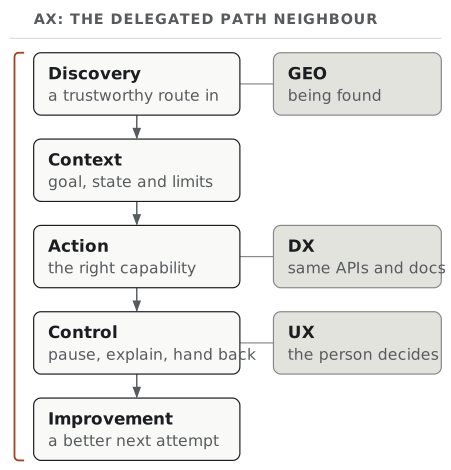
AX connects the concerns across a workflow:
- Discovery: Can the agent find a trustworthy route into the task?
- Context: Can it understand the goal, relevant state, and boundaries?
- Action: Can it choose and use the right capability?
- Control: Does it pause, explain, and return work at the right moments?
- Improvement: Can the team learn from the path and make the next attempt better?
So AX is a product lens for the full path an agent takes while acting for someone, which is wider than interface polish, APIs or search visibility.
“Agent experience” already means two different things in the AI world
In the AI world the term is used in two distinct senses, by two camps, and neither camp usually acknowledges the other.
Sense one: outward-facing product AX. This is the original coinage. Mathias Biilmann, Netlify’s CEO, published “Introducing AX: Why Agent Experience Matters” on 28 January 2025, defining AX as “the holistic experience AI agents will have as the user of a product or platform” (biilmann.blog, 2025-01-28). In this sense, the agent is an external visitor: it arrives at your site, docs, or API on behalf of somebody who is not on your payroll, and AX is the quality of what it finds. Netlify’s own agent experience page and the community hub at agentexperience.ax both work from this definition.
Sense two: inward-facing coding-agent AX. In April 2026, the developer-productivity vendor DX launched a product it also calls Agent Experience, which scores individual coding-agent sessions across Claude Code, GitHub Copilot, and Cursor on Requirements, Steering, and Scope (getdx.com, 2026-04-10). Here the agent is an internal tool used by your own engineers, and AX is a measure of how well your codebase, documentation, and prompting practices set that tool up to succeed. It is, in effect, a branch of DX.
Both senses are legitimate and both are in active commercial use, but they are different disciplines. The outward sense is a product question: what does a stranger’s agent encounter? The inward sense is an engineering-effectiveness question: how well does our own agent perform inside our repository? A team that adopts an “AX programme” without saying which sense it means will end up with an internal tooling metric and an unimproved public product, or the reverse.
A practical rule is to ask whose technology the agent is using, and for whom. If the agent is using your product, docs, API, SDK or CLI on behalf of someone outside your team, you are doing product AX, even when that someone is a developer and the agent is a coding agent. If the agent is your own engineers’ tool, working in your own repository, you are doing a specialised form of DX. Microsoft’s “What is Agent Experience (AX)?” (6 October 2026) is the first sense applied to developer technology: developers’ coding agents building with a vendor’s SDK, API or CLI (developer.microsoft.com). This site uses AX in the first sense throughout, across delegated jobs of every kind rather than coding alone.
And “agent experience” means something else entirely in contact centres
There is a third meaning that predates both AI senses and still holds ground in search results. In customer-service and contact-centre software, agent experience (AX) refers to the quality of a human support agent’s working life. Genesys defines it as “the quality of an agent’s day-to-day work environment, including the tools, processes and support systems that shape how effectively they serve customers” (genesys.com). Zendesk and eGain publish comparable explainers.
This usage is not fading. It is an established discipline with its own conferences, vendors and metrics, and the acronym collision is unlikely to resolve soon, partly because contact centres are now among the heaviest deployers of AI agents, which means both senses of “AX” can be live in the same room and the same budget conversation.
If you write or search in this space, spell out Agent Experience (AX) for AI agents on first mention. Do not assume a linked article shares your definition. And when a vendor claims to “improve AX”, check whether they mean your customers’ agents, your engineers’ agents, or your staff.
Agent experience design is the practice, not the score
If AX is the quality of what an agent encounters, agent experience design is the work of shaping it. The phrase is still settling (it appears variously as AX design, AXD, and “designing for agents”), but the practice it names is recognisable enough to describe.
Agent experience design mostly consists of five moves:
- Choose the workflow, not the autonomy level. Design begins with one job a person actually wants to delegate (reconcile an account, prepare a brief, resolve a support case), with a defined start, an observable outcome, and a reason to stop.
- Make entry points explicit. An agent should be able to establish what the product is for, who it is for, and what it can do here, without inference from layout.
- Write the capability layer for selection, not just for execution. Every tool, endpoint, or action needs a statement of purpose, its inputs, its constraints, what it returns, and when not to use it. Distinguishing near-neighbour actions is the hardest and highest-value part of the job.
- Design the pause. Consequential and irreversible actions need a moment where the agent stops, explains the situation in terms the person can evaluate, and hands the decision back with enough context to make it quickly.
- Design the recovery. Failure is the normal case, so the question is whether a failed attempt leaves behind enough state and explanation for the next attempt (by the agent or by a person) to be better than the last.
Two things agent experience design is not. It is not a single readiness score: no one number describes every model, product, and task, and the current crop of scoring frameworks disagree with each other about what to count. Nor does it remove the human. Done well, this work makes delegated activity more inspectable: more visible state, clearer approval moments, better records of what was attempted and why.
Use the distinctions to choose the right improvement
When a workflow goes wrong, name the failure before choosing a solution. If a person cannot understand a result, begin with UX. If a platform is difficult to implement against, begin with DX. If no one can find the right information, begin with GEO. If an agent cannot find, interpret, use, recover through, or return work across the product, begin with AX.
In practice the answer may touch more than one discipline. The distinctions are there to help you see the next useful design move clearly, and they are no reason to create separate teams or jargon.
A five-question triage
Run these in order on any workflow that is not working. The first “no” tells you which discipline you are actually in.
- Could a person find the right route to this task? No → GEO.
- Once there, does the page or endpoint state what it does and who it is for? No → GEO and AX overlap; fix the statement.
- Can a builder integrate it correctly on the first attempt? No → DX.
- Can an agent tell this capability apart from its nearest neighbour, and know when not to use it? No → AX, at the description layer.
- When it fails or hits a consequential choice, can the person see what happened and act? No → AX and UX together, at the handoff.
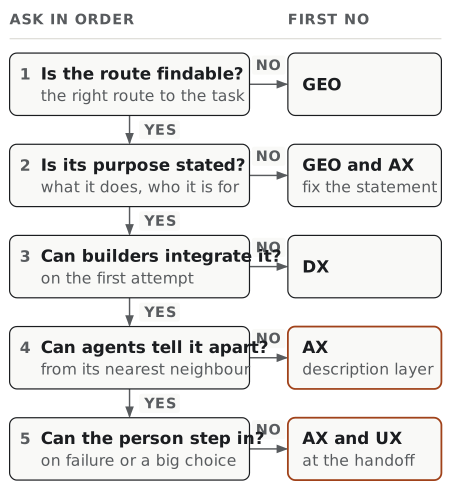
Most teams find their answer at step four or five. Those are also the two steps nobody currently owns.
Frequently asked questions
What is the difference between DX and UX? DX is the experience of the people who build with a product: its APIs, SDKs, documentation, examples and local tooling. UX is the experience of the people who use the finished product. The same company can be strong at one and weak at the other, because the two have different users, different interfaces and different measures of success. A developer judges a platform by how quickly a first working call happens; an end user judges the product by whether the job got done and could be understood.
What is the difference between AX and DX? DX serves a person building with a product, who can browse, ask a colleague and apply judgement across a long session. AX serves an AI agent operating the product during a task, which has only what the surface states at the moment of choice. The surfaces overlap, because agents read the same docs and call the same APIs, but the cost of ambiguity differs: unclear documentation makes a developer stop and ask, while an agent often proceeds anyway. That is why AX work concentrates on tool names, parameter meanings, when not to use a capability, and error text that names the next step.
Is AX just UX for machines? Not quite, and the shorthand causes real mistakes. UX designs for a user who recognises patterns and carries context between sessions. AX designs for a user that must be told, in the surface itself, what a human would infer. The methods overlap, but the assumptions are different.
Is AX replacing UX or DX? No. Every consequential delegated action still ends at a person who has to understand and approve it, which is UX work, and agents still consume the same APIs and docs that developers do, which is DX work. AX is a lens across the delegated path, not a successor discipline.
Who coined “Agent Experience”? In the AI sense, Mathias Biilmann, in a post published 28 January 2025. The contact-centre sense of “agent experience” is older and unrelated. There is no standards body that owns either definition.
Is it “agent experience” or “agentic experience”? Both appear in the wild. The originator’s framing is “Agent Experience”, and that is the more widely used form. Prefer it unless you are quoting a source that says otherwise.
Does GEO work belong to the AX team? Usually not, and it is worth keeping the budgets separate. Discovery work is measured in retrieval and citation; AX work is measured in whether delegated tasks complete. Conflating them tends to produce a lot of published files and no improvement in task completion.
Where does MCP fit in this picture? MCP is one implementation layer beneath AX: a protocol for exposing tools and resources to agent hosts. Adopting it does not by itself constitute good AX, in the same way that having an API does not by itself constitute good DX. The descriptions, constraints, and error text you put inside it are where the experience lives.
All four disciplines serve the person’s goal. AX treats the delegated path to that goal as part of the product.