
On this page · 10 sections
- What does an AI agent actually see on your website?
- Use real structure for real actions
- Keep the journey stable
- Make essential information available in the page
- Decide your crawler policy on purpose
- Where does llms.txt fit?
- Review the useful path
- What the evidence says
- What agent-friendly does not mean
- Frequently asked questions
Agents may encounter a site through a rendered screen, its HTML, or the accessibility tree that describes the page’s meaningful controls and content. When those views disagree, a task that looks simple to a person can become fragile for an agent. Google’s practitioner guidance on web.dev covers the accessibility tree and agent-facing site UX for exactly this reason: it is the structured representation that assistive technology, and increasingly agents, rely on.
This guide covers what agents actually read, the structural choices that matter, what belongs in the page text, how to set a crawler policy, where llms.txt fits, and how to review a journey without buying a tool.
What does an AI agent actually see on your website?
An agent working on someone’s behalf reaches your site in one of three modes, and each mode reads something different.
A retrieval agent or answer engine reads your indexed text. Google Search Central documents that its generative AI features are rooted in core Search ranking and quality systems, using retrieval-augmented generation and query fan-out to gather supporting pages. Its “AI Features and Your Website” guidance (2026) states there are no additional requirements to appear in AI Overviews or AI Mode beyond foundational SEO, and that a page must already be indexed and eligible to show a snippet. Microsoft’s Copilot Studio documentation similarly describes web search over Bing-indexed public websites, with citations returned by URL. If a page is not retrievable, nothing downstream matters.
A browser agent reads the DOM and the accessibility tree, and sometimes a screenshot. It needs to identify what is interactive, what each control does, and what state the page is in. A <div> with a click handler is invisible to that reasoning in a way a <button> is not.
A task agent with tools may skip your pages entirely and use an API, an MCP server, or documentation. That path is covered in Write agent-readable documentation and Write tool descriptions an agent can act on. The website still matters, because it is often where the agent orients before it acts.
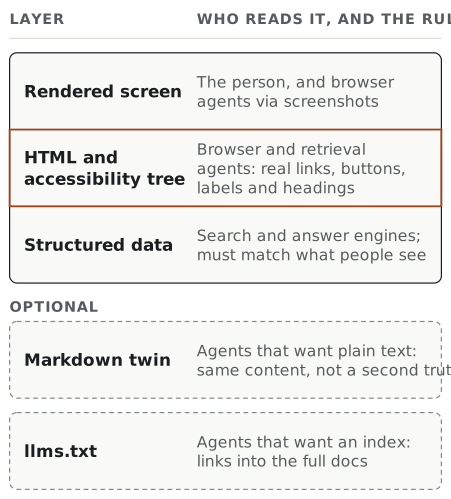
One practical consequence, offered as reasoning rather than a finding: design for the least-privileged reader. A page that works for a text-only retrieval pass usually works for the other two.
Use real structure for real actions
Links should be links, buttons should be buttons, form fields need clear labels, and headings should describe the content beneath them. These choices make a site more accessible to people and give an agent a clearer map of what is interactive and why it matters.
A short checklist covers most of it:
- Navigation is crawlable HTML. Google’s link best-practice documentation is explicit that links need a resolvable
hrefto be followed. A menu built purely from JavaScript event handlers is a dead end. - Critical content is server-rendered. If the answer only exists after a client-side fetch, a retrieval pass may never see it.
- One
<h1>, then honest heading levels. Headings are the outline an agent chunks against. - Every input has a
<label>. Placeholder text is not a label; it disappears at the moment of typing and is unreliable in the accessibility tree. - State is announced, not implied. Disabled, selected, expanded, invalid, and loading states belong in ARIA attributes or native elements, not only in colour.
- No ghost overlays or fake controls. Invisible layers that intercept clicks, and elements styled as buttons that are not, are among the most common ways an agent gets stuck on a page a person finds trivial.
None of this is new. It is the accessibility baseline, applied knowing that a second kind of reader now depends on it.
Keep the journey stable
Important actions should not move unpredictably, hide behind invisible layers, or depend on hover-only behaviour. A stable page helps an agent connect an instruction, a visible control, and the outcome that follows.
Instability is the failure mode that costs the most and shows up the least in analytics. A person who meets an unexpected interstitial adapts in half a second. An agent may retry, take a wrong branch, or abandon the task. If your product hides that history, you will read the eventual success as a clean run. That is the argument in Record retries as product history.
Concretely, stability means: consistent URLs for the same resource, actions that stay in the same region of the page across sessions, no randomised A/B variants on the critical path of a delegated task, and modals that can be reached and dismissed through the DOM rather than only by pointer gesture.
Make essential information available in the page
Put the decision-critical details close to the action: what the visitor can do, who it is for, what is required, and what happens next. An agent cannot rely on the same background assumptions as a returning human user.
A returning customer knows your shipping cut-off, knows the plan they are on, and knows that “Contact sales” means something different from “Start free”. An agent knows none of that. It knows what the page says.
So write the constraint down. Instead of “Fast delivery”, write “Orders placed before 16:00 GMT ship the same working day.” Instead of “Flexible pricing”, write “Billed monthly; cancel any time; no refunds for the current period.” And instead of a bare “Submit”, use a button whose label and adjacent text say what submitting does.
Research on how answer engines cite pages is still young, so read it with caution. A 2026 critical survey of the generative-engine-optimisation literature by Martinez concludes that terminology and metrics remain heterogeneous across studies, and that generic on-page heuristics transfer poorly across engines and dates. Treat any published list of “signals”, including the suggestions in this guide, as a direction to check against your own pages rather than a rule to apply.
What survives that caution is simple. Writing that states definitions, numbers, comparisons, and procedures plainly is easier to quote accurately than atmosphere is. That is a good reason to write them clearly, and a bad reason to stuff a page with statistics it does not need.
Decide your crawler policy on purpose
Most sites inherit a crawler policy by accident. Make it a decision.
Different crawlers exist for different purposes, and the vendors document them. OpenAI’s publisher and developer FAQ (2026) states that any public website can appear in ChatGPT search, and recommends not blocking OAI-SearchBot if you want summaries and snippets included; OpenAI documents GPTBot and ChatGPT-User separately, for training and user-triggered fetches respectively. Google documents its own crawler controls in Search Central. Write down which purposes you allow, then encode it.
The file below is an illustration of what a written-down decision looks like, not a recommended configuration. The Disallow line is there to show a deliberate carve-out being made explicit; copy the shape, not the choice.
# robots.txt: allow search and answer surfaces, decide training separately
User-agent: *
Allow: /

User-agent: OAI-SearchBot
Allow: /

User-agent: GPTBot
Disallow: /internal/

Sitemap: https://example.com/sitemap-index.xml
Two rules keep this honest. First, robots.txt is a request, not an access control; anything that must not be read needs authentication. Second, publish the reasoning somewhere a human can find it. A policy nobody can explain gets reverted by the next person who touches the file.
Where does llms.txt fit?
llms.txt is a public convention proposed at llmstxt.org (the v2 page was published in 2024 and carries a 2026-08-10 modification date) for giving agents a concise, linked index of a site’s most useful documentation. It is a proposal and community convention, not a standards-body specification, and Google’s guidance is clear that no special AI file is required for its Search features.
That makes it a reasonable low-cost addition and a poor primary strategy. A useful llms.txt is thin:
# Example Docs

> One-sentence description of what this product does.

## Start here

- [Quickstart](https://example.com/docs/quickstart/): Install, authenticate, first call.
- [Authentication](https://example.com/docs/auth/): Token types, scopes, expiry.

## Reference

- [API reference](https://example.com/docs/api/): All endpoints and schemas.
Keep it an index into richer documentation, not a second source of truth about behaviour. A stale llms.txt is worse than none, because it invites an agent to trust it.
The same caution applies to structured data. Google’s structured-data policies require markup to match the visible content of the page; markup that describes things a reader cannot see is a spam risk.
Review the useful path
Choose one important journey, such as finding a product detail, completing a form, requesting help, or comparing options, and inspect it through the page structure as well as the visual experience. The gaps are often practical and fixable.
A repeatable half-day version of that review:
- Name the job and its success condition. “Find the enterprise SSO requirements and request a trial” is a job. “Improve AX” is not.
- Fetch each page with JavaScript disabled. Note every fact that vanishes.
- Walk the accessibility tree for the pages carrying the action. Note every control that has no accessible name, and every state that is only visual.
- Read the page as a stranger. List every fact required to make the decision that is not written on the page.
- Run the journey with a browser agent and record where it hesitates, backtracks, or asks a question.
- Fix the smallest thing that removes the biggest hesitation, then repeat.
That loop is the website version of the wider method in Run an Agent Experience review. If the failures you find are about which action to take rather than how to take it, the next move is usually Agent workflow design: scoping the first one, and the discipline boundaries are set out in AX, UX, DX, and GEO.
What the evidence says
Most advice on agent-friendly websites, this guide included, is reasoning from how agents read pages rather than a measured result. One controlled study is worth knowing, as long as you keep its limits in mind.
In Designing Agent-Ready Websites for AI Web Agents (July 2026), Said Elnaffar and Farzad Rashidi compared two versions of one prototype shop with the same catalogue, prices, stock and shopping workflows. One was a human-oriented baseline. The other was an “agent-ready” version that also exposed product data as JSON and JSON-LD, gave controls explicit labels and identifiers, and added evidence pages and fields saying how current information was. Three browser-agent models (GPT-4.1, Gemini 2.5 Flash and Grok-4 Fast) ran five tasks ten times each on both versions, 300 runs in all. The agent-ready version produced 134 fully successful runs out of 150, against 74 out of 150 for the baseline (strict success rates of 89.3% and 49.3%). Partial outcomes fell from 43 to 3, and the average number of steps from 9.31 to 6.49. The largest gains were in extracting product details, comparing products and choosing under several constraints.
Its limits matter as much as its results:
- It is one site. Five tasks, three models and a single prototype shop, built for the study to test the authors’ own framework.
- It tested a bundle. Several changes were made at once, so the study cannot say which of them did the work. The authors themselves call for ablation studies.
- It did not test agent-specific endpoints. Markdown twins, MCP servers, WebMCP and
llms.txtwere not part of the comparison. - It has not been replicated. It is a preprint; the authors describe it as “a controlled proof of concept” and their results as “preliminary evidence”.
Read it as support for the direction of this guide (state the facts, label the actions, keep the structure honest), and not as a forecast for your own site.
The second piece of evidence is a practitioner’s rule. When Cloudflare’s agent readiness checker gave his static blog a poor result, Russ McKendrick fixed the checks that applied and deliberately skipped the rest. A blog with no API, no sign-in and no MCP server has nothing true to put in those discovery documents, and publishing stub versions to turn the checklist green, he writes, “just lies to agents” by sending them to endpoints that do not exist. Treat a readiness scanner as a prompt to ask whether each check applies to you. Where it does not, a failing check is the accurate result. Each scanner also looks at a different object, so compare agent readiness scores by what they measure before reading much into the number.
What agent-friendly does not mean
It does not mean building a separate machine-only site. Two versions of the truth drift apart, and the machine copy is always the one nobody checks.
It does not mean stripping the design. Nothing in this guide argues against visual craft; it argues that the visual layer should sit on top of an honest structural layer rather than replace it.
It does not mean chasing a score. There is no stable, cross-engine number that certifies a site as agent-ready, and the current research literature does not support one. What you can defend is narrower: this journey now works, through the structure, for a reader who cannot see.
Frequently asked questions
What makes a website agent-friendly? An agent-friendly website is crawlable, server-rendered where it matters, semantically marked up, stable across visits, and explicit about the facts a visitor needs before acting. Agents read the HTML and the accessibility tree, not the visual impression, so real links, real buttons, labelled inputs, and honest headings do most of the work.
Do I need an llms.txt file for AI agents to use my site?
No. llms.txt is a public proposal hosted at llmstxt.org, not a standards-track specification, and Google’s Search Central documentation says no special file is required to appear in its AI features. Treat it as an optional index into your documentation and fix crawlability, semantics, and content quality first.
Should I block AI crawlers in robots.txt?
That is a policy decision, not a default. OpenAI’s publisher documentation says any public website can appear in ChatGPT search and recommends not blocking OAI-SearchBot if you want your pages summarised there. Decide per crawler and per purpose, write the decision down, and make robots.txt reflect it deliberately.
Is building for agents different from accessibility work? They overlap heavily but they are not the same. Both depend on the accessibility tree and semantic structure, so accessibility work usually improves agent legibility for free. Agent Experience adds concerns accessibility does not cover: whether the page states the constraints and consequences an agent needs to choose an action, and whether the journey is stable enough to complete without a person watching.
An agent-friendly website is a clearer, more stable version of the site people already need.