
On this page · 8 sections
A human approval workflow for AI agents is made of small, reusable patterns: how a person approves, how work changes hands, and how a run recovers when a step fails. This library names 17 of them, plus two failure modes to design against. Each pattern has the same four parts: its intent, when to use it, how it fails, and a public example. The examples describe documented behaviour of public products and open-source projects as checked on 8 October 2026; products change often, so treat each one as an illustration of the pattern, not an endorsement or a ranking. Where a finding comes from a research paper, the guide says so and gives the paper’s own figures with their scope.
For the reasoning behind approval design itself, start with Human approval workflows for AI agents. This page is the catalogue that goes with it.
The patterns at a glance
| # | Pattern | Family | In one line |
|---|---|---|---|
| 1 | Approve the plan, gate the exceptions | Approval | One approval for the shape of the work; a stop for anything outside it |
| 2 | Allow, ask or never | Approval | Standing rules decide which actions run, stop or never run |
| 3 | Approve what executes | Approval | The person approves the exact operation, and only that runs |
| 4 | Only the requester approves | Approval | The person who asked is the person who approves |
| 5 | Enter secrets out of band | Approval | Secret values go into a trusted page, never through the model |
| 6 | Send consent to the person | Approval | A missing grant becomes a redirect for the person, not an error for the model |
| 7 | Approve per origin or scope | Approval | Approve where the agent may act, and say what that does not cover |
| 8 | Confirmation is not approval | Approval | Record whether a known person decided, or only a client said yes |
| 9 | Pause, hand over, resume | Approval | A named waiting state, then the same run continues |
| 10 | Send a context packet | Handoff | A small structured record instead of a transcript |
| 11 | Return the reason for the work | Handoff | Every handoff and approval carries why, as a field |
| 12 | Hand back the step | Handoff | Prepare the step a person must take, and hand it over read-only |
| 13 | Idempotency keys | Recovery | One key per intent, reused on every retry |
| 14 | Verify before retry | Recovery | Check what happened before repeating a side effect |
| 15 | Errors that name the next step | Recovery | The failure carries the move that fixes it |
| 16 | Exit codes that tell the truth | Recovery | Exit status says whether the promised outcome was achieved |
| 17 | Refusals that name the missing permission | Recovery | A refusal lists the permission that would make the call succeed |
Approval patterns
1. Approve the plan, gate the exceptions
Intent. Let a person approve the shape of the work once, instead of every step, and still stop for anything that falls outside it.
Use when. The task has many low-risk steps and a few consequential ones, and the plan can be written down before the work starts.
How it fails. Plan approval quietly becomes approval for everything that follows, including steps the plan never mentioned. A 2026 preprint by Salerno and colleagues, based on interviews with 18 practitioners and a survey of 115, recommends that permission systems separate what an agent is allowed to do from what the user intended, and separate rejecting one action from rejecting the whole approach. A plan approval meets both only if steps outside the plan still stop.
Public example. Anthropic’s Claude Code has a plan mode in which the agent reads files and runs read-only commands but does not edit source files, so a person can review a plan before any change. Its manual mode asks before each action that needs approval.
2. Allow, ask or never
Intent. Decide in advance, by rule, which actions run without asking, which stop for a person, and which never run.
Use when. The same kinds of action recur and a person can name them, such as “run the tests” or “push to the main branch”.
How it fails. People keep choosing “ask”, so the rules settle little and approvals become routine. In a preprint by Ting Yan (August 2026), 113 participants without software backgrounds supervised a simulated day of 18 agent actions, seven of which went beyond what was asked. Participants who wrote their own allow, ask or never rules set 114 of their 140 rules to “ask”, and that condition blocked 20.1 percentage points less overreach than approving each action separately; of the 148 overreaching actions that ran under the rules, 133 ran after a person approved them. These are the paper’s figures for one simulated setting with one participant pool. The useful finding is that many actions outside the original request went through after people approved them, so an “ask” should show what falls outside the request.
Public example. Claude Code’s permission rules come in three kinds, allow, ask and deny, and are evaluated in a fixed order: deny first, then ask, then allow, with the first match deciding.
3. Approve what executes
Intent. The person approves the exact operation, shown from the call itself, and the system runs that operation and nothing else.
Use when. The action spends money, sends something, deletes something, publishes, or widens access.
How it fails. The approval screen shows the agent’s own summary rather than the call, or the pending call changes after the person approves it. Both failures, and the preprints that demonstrate them, are covered in Bind the approval to what executes.
Public example. Stripe’s Link agent wallet has the agent create a spend request for a specific amount and seller, with a description of at least 100 characters that the customer reads when deciding. The customer approves on the Link website or app, which the agent does not control, and Link then issues a one-time payment credential for that purchase. A request that is not answered within 10 minutes expires.
4. Only the requester approves
Intent. The person whose request started an action is the person who approves it.
Use when. Agents work in shared spaces, such as a team chat thread, where several people can see an approval button.
How it fails. Anyone in the thread can approve, so one person can run a tool under another person’s request. The opposite failure is a rule so strict that a legitimate second approver, such as a manager, has no way to be named.
Public example. Vercel’s open-source agent framework eve changed this in version 0.72.0 (7 October 2026). Approvals without a response policy can now be approved or cancelled only by the person whose turn requested the call, so a shared thread no longer lets someone else run a tool under the requester’s turn. Tools that need other approvers declare them in an approval.response policy.
5. Enter secrets out of band
Intent. A secret value never passes through the model. The person types it into a trusted page, and the agent only ever handles its name.
Use when. An agent needs to set an API key, a password or a token.
How it fails. The client cannot open the trusted page, so the agent asks the person to paste the secret into the chat, where it ends up in the transcript and the logs.
Public example. Supabase’s MCP server has a tool, create_edge_function_secret, that asks for the secret’s name and project but not its value. The value is entered in the Supabase Dashboard through a URL handoff, and the documentation says secret values belong only there, never in chat, model input or tool arguments. The tool is offered only when the client supports that kind of handoff. Stripe’s Link documentation makes a related point for card details: hosted agents should write them to a file rather than print them, where they can persist in transcripts and logs.
6. Send consent to the person, not the model
Intent. When a person must grant access, the request reaches them as a redirect or a prompt, not the model as an error message.
Use when. An agent connects to a service on a person’s behalf through OAuth.
How it fails. The missing grant shows up inside a tool result. The model reads it as an error to work around, and may retry, switch tools or give the person a vague explanation.
Public example. Vercel’s Connect integration for TanStack AI (24 September 2026) fails client creation with a consent challenge before the model runs, and the application redirects the person to the consent page. Vercel gives the reason directly: otherwise a consent error raised within a tool call would reach the model as an error string rather than the user as a redirect.
7. Approve per origin or scope, and say what it does not cover
Intent. Approve where the agent may act, such as a website or a project, separately from what it does there.
Use when. Approving every action would mean a prompt every few seconds, as in browsing.
How it fails. A person reads approval of a place as approval of every action in it.
Public example. OpenAI’s computer use tool in the Agents API requires the user’s approval before the browser accesses each new website origin, including public sites. The documentation is explicit about the limit: origin approval does not enforce confirmation before individual actions. If an application must guarantee confirmation before purchases or destructive changes, it should restrict the hosted browser or use a browser runtime it controls, because asking through a function tool relies on the agent choosing to call it.
8. Confirmation is not approval
Intent. Keep two things apart in the record: a client said yes, and a known person decided.
Use when. Your system receives yes or no answers from a protocol prompt, a command-line prompt or an “are you sure?” dialog.
How it fails. The server logs every yes as a person’s approval, when some of them came from a hook, a rule or an automatic answer.
Public example. Supabase’s MCP documentation asks for confirmation before creating paid projects and before destructive SQL, using the protocol’s elicitation feature. It says plainly that this is separate from the client’s own approval of tool calls, that some clients support hooks or rules that answer elicitations automatically, and that the prompts are a guardrail rather than a guarantee of human review. Users can also switch them off per tool with skip_elicitations. Where an approval must be real, collect it on a surface the agent cannot answer, as Stripe does with the Link app in pattern 3, and record which kind of yes you received.
9. Pause, hand over, resume
Intent. The agent stops in a named waiting state, a person does what only they can do, and the same run continues.
Use when. A run meets a one-time code, a sign-in, a CAPTCHA or a judgement call partway through.
How it fails. The pause loses the run’s state, so resuming means starting again. Or the person’s input travels back through the transcript: a one-time code typed into a resume message becomes part of the run’s text and its logs. A short life does not undo that, so have the person enter codes and passwords on a protected page instead (pattern 5).
Public example. Browserbase added pause and resume for agents on 24 September 2026. A run takes a plain-language pauseWhen condition, such as a verification code being required; the agent enters a PAUSED state when it is met, and a follow-up task resumes the same browser session.
Handoff patterns
10. Send a context packet, not a transcript
Intent. The next actor receives a small, structured record: the intent, the constraints, what has already changed, the authority used, the evidence, and the open question.
Use when. Work passes from an agent to a person, to another agent or to a sub-agent.
How it fails. Either the whole transcript is passed on, so the receiver has to dig through it and private detail travels with it, or nothing is passed on and the receiver starts again.
Public example. In OpenAI’s Agents SDK, a new agent sees the entire previous conversation by default, and an input_filter changes what history it receives. The fields worth putting in the packet are set out in An agent context handoff should carry the reason for the work.
11. Return the reason for the work
Intent. Every handoff and every approval request carries why the work is happening, in a field the receiver can read and the system can store.
Use when. Escalations, approvals and purchases, or anywhere a person will be asked to judge a proposal.
How it fails. The reason lives only in the transcript, is lost at the boundary, or is written after the fact to justify what already happened.
Public example. The same Agents SDK lets a handoff declare an input_type; its documentation shows an escalation that carries a reason, validated and passed to a callback for logging, and suggests small fields such as reason, priority or summary. Stripe’s Link spend request in pattern 3 makes the reason mandatory: the agent must state what it is buying and why, and that is the text the customer reads.
12. Hand back the step the agent should not take
Intent. When the next step belongs to a person, the agent prepares it and hands it over in a read-only form, rather than attempting it or stopping without saying why.
Use when. Production deployments, DNS changes, claiming an account, accepting terms, or any interactive wizard.
How it fails. The agent starts an interactive command and hangs on a prompt, or reports the task as done without saying that the last step is still open.
Public example. Clerk’s accountless set-up post (30 September 2026) leaves two steps to the person: claiming the app, and running clerk deploy, an interactive wizard for the production instance, its DNS records and its OAuth providers. Clerk says that, as a result, an agent gets a read-only handoff from it rather than a deploy. The wider pattern is described in Let agents start before anyone signs up.
Recovery patterns
13. Idempotency keys
Intent. Let a client repeat a write without repeating its effect.
Use when. Any create or update with a side effect, especially money, messages and provisioning.
How it fails. A new key is generated for each retry, which defeats the point; the same key is reused for a different intent; or the retry arrives after the server has forgotten the key.
Public example. Stripe’s API stores the status code and body of the first request made with each idempotency key and returns the same result to later requests with that key, including server errors. It compares the parameters of a repeated request with the original and returns an error if they differ, and keys can be removed once they are at least 24 hours old. Stripe’s Link documentation applies the same idea to agents: give each spend request a key that represents that purchase intent, so the agent can retry safely.
14. Verify before retry
Intent. After a timeout or an unclear result, find out what actually happened before repeating anything with a side effect.
Use when. Timeouts, dropped connections, crashed workers and any response the agent cannot interpret.
How it fails. A timeout is read as “nothing happened”, and the side effect runs twice.
Public example. OpenAI’s computer use guide tells developers to wait for the agent’s turn to finish and verify its result, and, if the connection drops, to recover the same session before retrying. The site’s synthetic worked example on timeout recovery walks through the decision step by step, and Agent error recovery belongs on the main path explains the correlation key that makes the check possible.
15. Errors that name the next step
Intent. A failure carries the move that would fix it, in a form the agent can act on.
Use when. Always, but most of all where the fix needs a person, a different input or a different route.
How it fails. The hint is prose that only a person can follow, or it names a command, flag or page that no longer exists.
Public example. Stripe’s Link agent wallet returns a next_action block when a spend request needs attention. It includes a resolution with a closed set of values: resume automatically after the customer acts, create a new request, or create a new request after the customer finishes the action at a given URL. The documentation tells agents to branch on the resolution rather than the type. Vercel’s Sandbox CLI 4.0.1 (August 2026) changed its not-found error to suggest the command that lists existing sandboxes, so each message carries the action to take next. Neon’s claimable project errors include a retryable field and say to retry only when it is true.
16. Exit codes that tell the truth
Intent. A command’s exit status says whether it achieved the outcome it promises.
Use when. Any command-line tool an agent might run.
How it fails. A command that failed, was refused or cancelled the requested change exits with status 0, and the agent, which often reads the exit code as its main signal, reports success. The opposite mistake is to treat every empty result as a failure. A search that finds nothing, or a change that was already in place, can exit 0 if the command’s contract counts it as success, as long as the output says so plainly.
Public example. The Command Line Interface Guidelines state the rule: return zero on success and non-zero on failure, because scripts rely on it. Cloudflare’s new cf command-line tool, which is in beta, documents the gap in its own guide for coding agents: in a non-interactive session, a destructive command run without --force prints Aborted. to standard error, makes no change and exits with status 0. The documentation warns that a successful exit does not mean the resource was deleted. An agent working with that tool has to read standard error as well as the exit code; a tool designed for agents would exit non-zero when the requested change did not happen.
17. Refusals that name the missing permission
Intent. A refusal says exactly which permission would make the call succeed.
Use when. Any API, tool or command that checks scopes or roles.
How it fails. A bare “forbidden” leaves the agent to retry, try other tools, or ask the person for a broader token than the task needs.
Public example. Supabase made scoped personal access tokens generally available on 6 October 2026. When a token lacks a permission, the Management API’s 403 response lists the missing ones in a missing_permissions array; each MCP tool checks the token’s permissions, and the dashboard shows which tools a token can call. A token’s access cannot be changed after creation, so the fix is a new, correctly scoped token rather than a wider one. Neon’s claimable projects return scope_insufficient and capability_requires_claim, two different refusals for two different fixes.
Failure modes to design against
Two recent preprints name failures that the approval patterns above do not prevent on their own. Both terms come from the papers, not from any standard. The figures are the papers’ own, from their own test sets, and have not been reproduced here.
Approval laundering
Agent Approval Laundering by Jinqian Zhang and colleagues (preprint, 23 September 2026) describes an approval record that names the command or tool call a person approved but leaves out the effects of the workflow that call sets off. A package installation can run its own lifecycle scripts and write files; a tool call can use network access. The person approved something real, but the record does not cover everything that ran under it. Across 111 fixed pairs of approval records and execution traces, the paper reports that records missing some effect fell from 40 when only explicit fields were used, to 17 with knowledge of what commands do, to 13 with metadata available at decision time: better records narrow the gap without closing it. Its proposed remedy is to bind each invocation, before authorisation, to a prediction of the effects its workflow can have, and to keep that prediction with the decision.
Design response. Show known side effects on the approval card, not just the command, and store them with the decision.
Residual authority
When Consent Outlives Context by Zhihao Zhang and colleagues (preprint, 27 September 2026) describes approvals that persist across tasks or sessions and can be reused later without fresh consent, after the context that justified them has gone. The paper reports that, with this residual authority in place, attack success rose by up to 35.1 percentage points across 508 attack cases from the AgentDojo benchmark and six model families, and by 24.9 points on average across 55 live Terminal-Bench cases on three production coding agents.
Design response. Give approvals an expiry, tie them to the task that justified them, and treat “do not ask again” as a standing grant that someone should review.
A third failure, Loopjacking, where the approved operation is swapped or misdescribed, is covered in Human approval workflows for AI agents.
A worked example
This example is invented. Ledgerline is not a real product, and the steps describe no real API.
Tomás runs a bakery. He asks his agent to pay a supplier’s invoice of £1,240 through Ledgerline, his payments app.
- Allow, ask or never (2). Tomás’s rules say payments are “ask”, so the agent prepares the payment and stops.
- Approve what executes (3) and the reason for the work (11). The agent creates a payment request with the payee, the amount, the invoice number and its reason: “Invoice 4471 from Hillside Flour, due Friday, matches the delivery note of 2 October.” Ledgerline renders the approval card from the request itself and shows it in Tomás’s app.
- Only the requester approves (4). The request was Tomás’s, so only Tomás can approve it, even though his business partner can see the same thread.
- Errors that name the next step (15) and pause, hand over, resume (9). The bank asks for strong authentication. Ledgerline returns a next action with a link for Tomás and a resolution of “resume automatically”. The agent pauses, Tomás completes the check, and the same request continues.
- Idempotency keys (13) and verify before retry (14). The payment call times out. The agent does not send a new payment. It looks up the payment by its idempotency key, finds it went through, and records the result.
- Send a context packet (10). The agent hands the bookkeeping to Tomás’s bookkeeper with a short record: what was paid, the reference, the reason, and one open question about which cost category to use.
At no point did the agent hold Tomás’s bank credentials, guess whether the payment had gone through, or ask Tomás to approve something other than the payment that ran.
Where to start
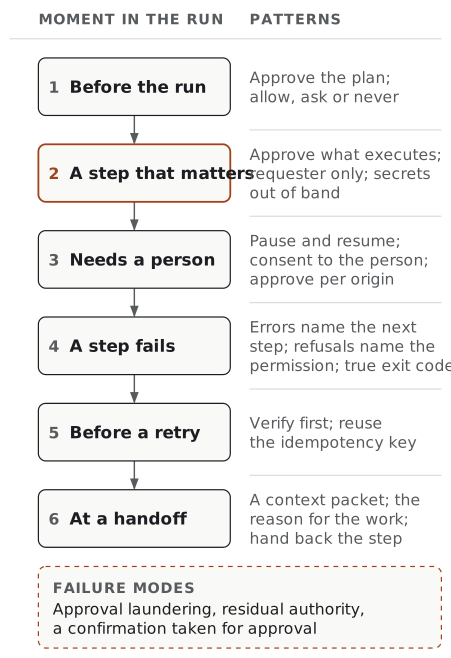
Take one consequential action in your product, such as a payment, a deletion or an outbound message, and walk it through the six moments in the map above. For each moment, ask whether the matching pattern is present, partly present or missing. Then fix the first missing pattern on the path, not the most interesting one.
If you use the Open Agent-Readiness Rubric (v0.3), the patterns line up with its checks. Pattern 3 is the substance of Your system enforces approval: approval enforced by your system and bound to the exact action. Patterns 4 and 8 are Approval comes from the person: an approval counts only when a person your policy allows gave it, through a route the agent cannot operate. Pattern 5 is Secrets never pass through the agent. Pattern 13 is Writes are safe to retry. Patterns 5, 6 and 17 support Agent access can be narrow, which asks for narrow and revocable access. Patterns 14 and 15 cover the checks from Errors carry a fixed code to The agent can check what happened, pattern 17 is Refusals name the missing permission, and pattern 16 is Command-line tools report the real outcome. Pattern 8 also serves Agents are told apart from people, and patterns 1 and 2 serve Approvals are few and show the real action. Recovery that keeps a record of each attempt is the subject of Record agent retries as product history.
Frequently asked questions
What is human-in-the-loop authorisation for AI agents? Human-in-the-loop authorisation is the point in an agent run where a person grants or refuses the authority for a specific action the agent has proposed. It only works as a control when three things hold: the person sees the exact action that will run, the system knows which person decided, and the approval cannot be reused later for something else. A confirmation prompt that a client can answer automatically does not meet that bar.
How do you add a human in the loop to an AI agent? Decide in your system which actions need a person, usually by effect: spending, sending, deleting, publishing and widening access. At those points, pause the run in a named waiting state, show the person the real action and the reason for it, accept approve, change, ask or reject, and resume the same run from their answer. Keep secrets and consent on surfaces the agent cannot read or answer, and give approvals an expiry.
What is the difference between confirmation and approval? A confirmation is any yes the system received; an approval is a decision a known person made about a specific action. The two often look the same to a server. Supabase’s MCP documentation warns that some clients answer its confirmation prompts automatically through hooks or rules, so it treats them as a guardrail rather than proof of human review. Record which of the two you received, and collect real approval on a surface the agent cannot answer.
Should an AI agent ask for approval before every action? No. Asking for everything trains people to click yes. Approve the plan once, set standing rules for routine actions, and stop only for actions that are consequential or outside the original request. Be aware that standing rules do not remove the decision: in a 2026 preprint study, participants who wrote allow, ask or never rules chose ask for most of them, and many out-of-scope actions still ran after a person approved them.
What is approval laundering? Approval laundering is a term from a September 2026 preprint by Zhang and colleagues. It describes an approval record that names the command or tool call a person approved but leaves out the effects that call sets off, such as a package installation that runs its own scripts and writes files. The person approved something real, but the record does not cover everything that happened under that approval.
Why do AI agents need idempotency keys? Because agents retry, and a retry after a timeout can repeat a side effect such as a payment. An idempotency key is a value the client sends with a write so the server can recognise a repeat. Stripe’s API stores the result of the first request for each key and returns the same result to later requests with that key, and rejects a reused key whose parameters differ. Use one key per intent and reuse it on every retry of that intent.
Pick one consequential action in your product and walk it through the six moments in the map. The missing pattern is usually easy to spot.