
On this page · 7 sections
Claim-later onboarding lets an AI agent create and use a small, limited resource before any person has an account, and lets a person take ownership of it later through a claim link. The idea moves identity from the first step of onboarding to the last. It matters for agents because a sign-up form, an email check or a request to paste an API key stops a run that a person started and then walked away from. This guide describes how several developer products do it today, the six design questions behind it, the risks, and a checklist you can apply to your own product. Product behaviour below is as documented on 8 October 2026; it changes often, so check the linked pages before you rely on a number.
Why sign-up stops an agent
Picture the usual case. A person asks a coding agent to build a small app and leaves. Halfway through, the app needs a database. The next step would be a sign-up form, an email confirmation and an API key to copy into a file. The agent cannot do any of those honestly, so the work stops until the person comes back.
Vendors describe the problem in the same terms. Clerk’s accountless setup post (30 September 2026) opens with “Agents stall on account creation.” Neon’s Claimable Neon post (10 September 2026) lists the same three blockers: a sign-up form, an email verification, and an API key the agent does not have. WorkOS, introducing auth.md (21 May 2026), puts it more generally: sign-up forms were built for people clicking on screens, and even OAuth assumes a person in the loop.
Claim-later onboarding answers this by splitting two things that sign-up joins together: the agent creates the resource, and a person owns it. Between the two, the resource lives under limits that make it safe to have no owner.
What it looks like in public products
The products below all document a version of the pattern. They fall into three shapes.
- The agent starts with no identity. The agent itself calls the service anonymously and receives a resource of its own.
- A platform holds the resource. An app builder or coding platform creates the resource in its own account, then hands a claim link to its user.
- Reads come before identity. No resource is created at all. The agent can look things up without a token, and identity is needed only to act.
| Product | Shape | What works without an account | Unclaimed lifetime | How the person claims |
|---|---|---|---|---|
| Clerk accountless apps | Agent, no identity | npx clerk@latest init creates a real development app with development keys, attached to no account |
Not stated in the post | npx clerk@latest auth login attaches the app to the person’s account |
| Claimable Neon | Agent, no identity | One temporary Postgres project, with optional Data API and auth, using credentials scoped to that project | 72 hours, plus a 15-minute claim code | The person opens the claim link, signs in, picks an organisation and accepts the transfer |
| Netlify anonymous deploys | Agent, no identity | netlify deploy --allow-anonymous creates a project with a live URL; sites with serverless or edge functions need an account |
One hour | The person logs in or creates an account |
| Prisma create-db | Agent, no identity | A temporary Prisma Postgres database with connection strings | 24 hours, then deleted | The person opens the claim URL from the command output, signs in and picks a workspace |
| Stripe claimable sandboxes | Platform holds it | A coding platform creates an anonymous test sandbox through its own Stripe App | 60 days, with a reminder email seven days before deletion | The person opens an onboarding link (valid seven days) and moves the sandbox into a new or existing Stripe account |
| Supabase for Platforms | Platform holds it | A platform creates a project in its own organisation | Set by the platform | The person signs in or signs up, chooses an organisation, reviews the platform’s OAuth scopes and confirms the transfer |
| Vercel Claim Deployments | Platform holds it | An agent or platform deploys under its own team and requests a transfer; attached Neon, Supabase and Prisma resources move with it | Transfer code valid 24 hours | The person opens a claim URL and picks a team |
| Vercel domain search | Reads first | Domain search, availability and pricing in the CLI and API with no token, up to 200 names per request | No resource is created | Buying or managing a domain still needs authentication |
Two related designs sit beside the table. Netlify’s agent instructions offer netlify login --request "{AGENT_NAME} wants to login", which prints a login link for the agent to give the person and a second link the agent can check to see whether the person has signed in. That is the next step after an anonymous deploy, when the work needs a real account. Stripe Projects goes the other way. Its recommended set-up has the person sign in to Stripe and add a payment method before the agent session starts; the agent then creates or links accounts with other providers and provisions resources from the command line, and the person can set spend limits per provider. Where claim-later delays identity, Stripe Projects establishes it once, up front, and lets the agent reuse it.
Underneath several of these sits a protocol. auth.md, authored by WorkOS, lets a service publish a Markdown file that tells agents how to register, and defines three registration methods: an agent provider vouches for a signed-in user; a person confirms a code the agent shows them; or the agent starts anonymously with limited access and a person claims the result later. Claimable Neon uses the anonymous method.
Six design questions
Every claim-later design answers the same six questions, whether it writes the answers down or not.
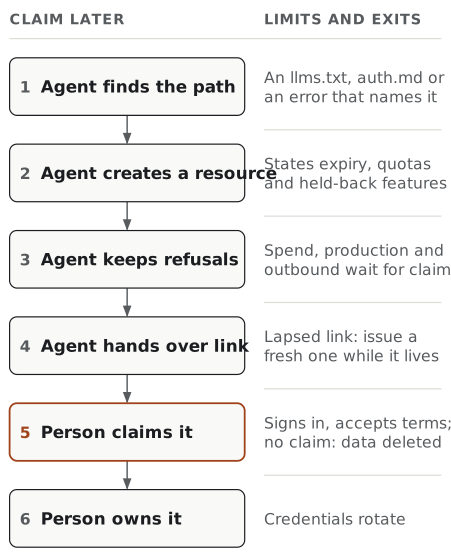
1. What can an unclaimed resource do?
The working rule is useful for building, useless for harm. An unclaimed resource should let the agent write code against it, run tests and show the person a result. It should not spend money, send anything to other people, or serve production traffic.
The public examples draw the line in similar places. Clerk says unclaimed applications and development keys are not production-ready, and its production setup command is an interactive wizard that the person runs, so the agent gets what Clerk calls a read-only handoff rather than a deploy. Netlify requires an account for serverless and edge functions. Vercel lets anyone search for a domain but requires authentication to buy one. Neon offers Postgres, its Data API and auth before a claim, and holds back functions, object storage and its AI gateway until after it.
How the line is drawn matters as much as where. Neon’s registration response lists each requested capability with granted: true or granted: false, and a later attempt to use a held-back service returns the error code capability_requires_claim. Its documentation then tells the agent what to do: keep the denied capability, give the person a claim link, and neither retry nor drop it. That last instruction is the important one. An agent that quietly drops a feature it could not get leaves the person with an app that looks finished and is not.
2. How long does it live?
Unclaimed resources need an end date, or they pile up with nobody responsible for them. The documented lifetimes vary widely: one hour at Netlify, 24 hours at Prisma, 72 hours at Neon and 60 days at Stripe. There is no right number. A short life suits a throwaway preview; a long one suits work a person needs time to review.
Neon’s documentation makes a point worth copying: there are two clocks. The project lives for 72 hours, but each claim code lasts 15 minutes, and asking for a new code cancels the previous unused one. Stripe works the same way at a larger scale, with a 60-day sandbox and a seven-day onboarding link that a platform can renew through a refresh_url. Vercel’s transfer code lasts 24 hours.
Put both clocks in the response as fields, not only in the documentation. Neon returns expires_at on the project and expires_in on the claim code. Stripe returns expires_at on the sandbox and on its onboarding link. Prisma’s command output states the deletion date in words. An agent can only pass a deadline to a person if it can read the deadline.
3. What limits abuse?
A resource that anyone can create with no account is an invitation to misuse. The public examples combine four controls.
- Small quotas. Neon caps an unclaimed project at 100 MB of storage and 1 GB of transfer.
- One resource per registration. Neon’s anonymous registration creates exactly one temporary project.
- Narrow, short-lived credentials. Neon’s access tokens are short-lived (the documented example lasts 900 seconds) and cover only that project. The project’s own Neon API key stays inside the service and is never returned to the agent.
- Capabilities held back. The features most useful for abuse, such as server-side code, wait for a claim.
Neon also explains a choice others will face. It considered allowing only a known list of agent products, and chose open anonymous registration instead, because it wanted to see which agents find the instructions and what they ask for. That is the vendor’s stated reasoning, not evidence that the choice is safe; the quotas and lifetimes are what bound the risk. Most services do not publish all of their abuse controls, so do not assume a missing control is absent.
4. How does the claim link reach the person?
The service gives the agent a link, and the agent has to get it in front of the right person with enough context to act on it. The public designs use three routes.
- The agent prints it. Prisma’s command output includes a claim URL and the deletion date. Neon’s
neon claim accept --no-openprints the URL instead of opening a browser. - The platform shows it. Vercel’s claim URL carries the transfer code and a
returnUrlparameter. Stripe’s onboarding link is shown by the platform, and Stripe itself emails the address the platform supplied seven days before deletion. - A code links the two sides. Neon’s claim uses a short user code, and auth.md’s user-claimed method has the person confirm a code. Netlify’s
login --requestgives the agent a link to poll while the person signs in.
A claim link is a bearer capability: whoever opens it first can take the resource. That argues for short-lived, single-use codes that can be reissued, which is what Neon does. The page the link opens should then show what is being claimed. Supabase’s claim screen has the person review the platform’s OAuth scopes and the project transfer details before confirming.
5. What happens to data and credentials?
Two moments matter: the claim and the expiry.
At the claim, credentials should change hands cleanly. Neon revokes the pre-claim access tokens and rotates the database password as soon as a claim begins, and the agent has to fetch a new connection string from the person’s organisation afterwards. Vercel moves attached resources from Neon, Supabase and Prisma along with the deployment. Supabase’s platform flow transfers the project while the platform keeps access through its OAuth integration, and tells platforms to remove any custom configuration they do not want the person’s project to keep. The person should be told plainly who still has access after the claim.
At expiry, the documented default is deletion. Prisma deletes an unclaimed database after 24 hours. Stripe permanently deletes an unclaimed sandbox after 60 days. Anything the agent built into the resource goes with it, so the person needs the deadline in front of them, not buried in a log.
6. Who accepts the terms of service?
Terms of service assume a person agrees to them. When an agent opens an account, it is not obvious who did. Public terms answer this differently, which is why it is a design question. GitHub’s terms of service (effective 27 April 2026) say an account must be created by a human, that accounts registered by bots or other automated methods are not permitted, and that a machine account must be set up by a person who accepts the terms and is responsible for it. Vercel’s agent playbook tells an agent it can use vercel signup to create an account on behalf of the user.
Claim-later designs move the question to a better place. The unclaimed resource belongs to nobody, and the person accepts the terms when they claim it: Stripe prompts a person without an account to register, Prisma and Supabase ask the person to sign in or create an account at the claim, and Neon asks them to sign in. If you offer this pattern, say in your own terms whether agents may create unclaimed resources, what limits apply before a claim, and that the person who claims accepts the terms at that point. This guide does not give legal advice; take the wording to whoever owns your terms.
The risks
Claim-later onboarding removes a blocker and adds new failure points. Plan for each of these.
- Orphaned resources. Without an expiry, unclaimed resources accumulate cost and attack surface. Set a lifetime and enforce it.
- Hosting with no owner. An anonymous deploy is public content with no accountable owner until someone claims it. Short lifetimes and held-back capabilities limit how useful that is to an abuser.
- Claim link capture. Whoever opens the link first owns the resource. Keep codes short-lived and single-use, and show the claimant what they are taking.
- Credential leakage. Pre-claim credentials end up in
.envfiles and logs. Neon treats the agent’s identity assertion as a secret to be stored like an API key; rotate everything at the claim. - Lost work. If the person misses the deadline, the work is deleted. The agent should state the deadline in its final message, and a reminder before deletion, as Stripe sends, helps.
- Silent gaps. A held-back capability that the agent drops without saying so produces an app that looks complete. Return a refusal that names the claim as the next step.
- Access that outlives the claim. A platform that keeps OAuth access after the transfer should say so on the claim screen.
- An agent claiming for the person. The claim is where a person accepts the terms and the responsibility. Keep it a person’s act, as Clerk does by leaving both the claim and production deployment to the person.
A worked example
This example is invented. Quillstore is not a real product, and the payload below describes no real API.
Ines runs pottery classes. Before leaving for the afternoon, she asks her coding agent to build a waitlist page that stores sign-ups in a database and emails her when someone joins. She has no Quillstore account.
The agent reads Quillstore’s llms.txt, which points to an onboarding file explaining the no-account path. It registers anonymously and receives one database and this response:
{
  "resource_id": "qs_7f3k",
  "status": "unclaimed",
  "expires_at": "2026-10-11T09:00:00Z",
  "limits": { "storage_mb": 100, "resources_per_registration": 1 },
  "capabilities": [
    { "name": "database", "granted": true },
    { "name": "outbound_email", "granted": false, "reason": "requires_claim" }
  ],
  "claim": {
    "url": "https://quillstore.example/claim?code=WXYZ-2345",
    "expires_in": 900,
    "reissue": "POST /v1/resources/qs_7f3k/claim"
  }
}
The agent builds the page and the database table, and tests a sign-up end to end. The email notification is refused with requires_claim, so the agent keeps the email code behind a flag rather than deleting it. It does not use the 15-minute claim code yet, because Ines is away. When it finishes, it asks for a fresh code and writes a short handoff:
The waitlist page works against a temporary Quillstore database. Email notifications are built but switched off, because Quillstore only sends email from claimed databases. To keep the database, open this claim link and sign in or create an account; the link works for 15 minutes, and I can make a new one. If nobody claims it by 11 October at 09:00 UTC, Quillstore deletes it and the sign-ups in it. Claiming rotates the database password, so I will need to pull the new connection string afterwards.
Ines returns, asks for a fresh link, signs up, accepts Quillstore’s terms and claims the database. The old credentials stop working. The agent pulls the new connection string and turns the email flag on. Every limit the agent met was in a field it could read, and every decision that needed a person reached her with a deadline and a reason.
A checklist mapped to the rubric
The Open Agent-Readiness Rubric covers claim-later onboarding in The agent can start before anyone signs up, added in version 0.3: if a job starts by creating something new, the agent can create a working, non-production version before anyone signs up and the claim step is documented, or the documentation says plainly that an account comes first and how the agent hands sign-up to the person. The items below are grouped by the rubric’s six tracks and name the matching or closest check where one fits.
Find
- The no-account path is described where agents look: an
llms.txtentry, anauth.mdfile, or the error an agent meets without credentials (close to APIs and tools are described where agents look).
Read
- The response states the resource’s expiry, quotas and held-back capabilities as fields (close to Each result is written down and Limits are published).
Act
- An agent can create one bounded resource without an account, and spending, production, custom domains and outbound messages are refused until a person claims it (The agent can start before anyone signs up, with Effects are stated before the step and Agent access can be narrow).
- Credentials before the claim cover one resource and expire quickly.
Recover
- A refusal before the claim returns a stable code that names the claim as the next step, and expired or already-claimed resources have codes of their own (close to Errors carry a fixed code and Errors say how to succeed).
- A lapsed claim link can be reissued while the resource still lives.
Hand back
- The claim screen shows what moves, who keeps access afterwards and which credentials will rotate (close to The person has a record).
- The person sees the deletion deadline, ideally with a reminder before it.
Boundaries
- Your terms say whether agents may create unclaimed resources, what limits apply, and that the person accepts the terms at the claim (close to The terms say whether agents may be used).
Start with the refusal. If an agent asking for a held-back feature today gets a generic 401 or 403, give that response a code that names the claim. It is a small change, and it is the one that stops an agent from dropping the feature without telling anyone.
Frequently asked questions
What is claim-later onboarding for AI agents? Claim-later onboarding, sometimes called provision now, claim later, lets an AI agent create a small, limited resource such as a database, a deployment or a development app without anyone having an account. The service returns credentials scoped to that one resource and a claim link. A person later opens the link, signs in or signs up, and takes ownership. If nobody claims it in time, the resource expires.
Can an AI agent sign up for a service on my behalf?
It depends on the service and its terms. Vercel’s agent playbook says an agent may run vercel signup to create an account on behalf of the user. GitHub’s terms of service, effective 27 April 2026, say an account must be created by a human and that accounts registered by bots are not permitted. Claim-later designs avoid the question for the first step: the agent creates an unowned resource, and the person accepts the terms when they claim it.
How long do unclaimed agent resources last? Each service sets its own limit, and they differ widely. As documented on 8 October 2026: Netlify gives one hour to claim an anonymous deploy, Prisma deletes a create-db database after 24 hours, Neon expires an unclaimed project after 72 hours, and Stripe deletes an unclaimed claimable sandbox after 60 days. Clerk’s announcement of accountless apps does not state an expiry.
How do services stop abuse of resources created without an account? The documented controls are small quotas, short lifetimes, narrow scopes and capabilities held back until a person claims. Neon caps an unclaimed project at 100 MB of storage and 1 GB of transfer and keeps its own project key away from the agent. Netlify requires an account for sites that use serverless or edge functions. Vercel lets anyone search for domains without a token but still requires authentication to buy one.
What is auth.md? auth.md is an open protocol for agent registration, published by WorkOS in May 2026. A service publishes a Markdown file that tells agents how to register, and points to OAuth metadata for the actual endpoints. It defines three registration methods: agent verified, where an agent provider vouches for a signed-in user; user claimed, where a person confirms a code; and anonymous, where the agent starts with limited access and a person can claim the result later. Claimable Neon uses the anonymous method.
What should an unclaimed resource be allowed to do? Enough to build and test, and nothing that spends money, reaches other people or serves production traffic. Keep paid plans, production promotion, outbound email, payments and custom domains behind the claim. When the agent asks for one of those, refuse with a code that names the claim as the next step, so the agent tells the person instead of retrying or silently dropping the feature.
A simple test: can an agent get from nothing to a working, limited resource, and can a person then take it over without surprises?